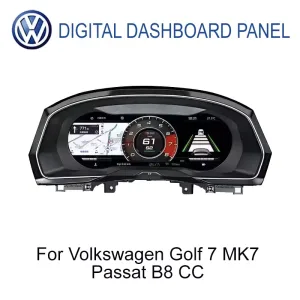
VW Golf Mk7 Digital-Cluster für ein übersichtlicheres Volkswagen-Fahrerdisplay
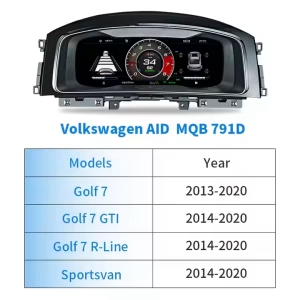
Das VW Golf Mk7 Digital-Cluster verwandelt den werkseitigen Instrumentenbereich in ein 12.3-Zoll-LCD-Cockpit-Display für unterstützte Golf 7, Golf Mk7 und Golf Mk7.5 Fahrzeuge. Es behält den fahrerorientierten Charakter des Volkswagen-Armaturenbretts bei und liefert gleichzeitig klarere Geschwindigkeits-, Drehzahl-, Warn-, Fahrten- und Fahrzeuginformationen. Vor dem Versand prüft iKAGOO Ihr Fahrzeugjahr, das Armaturenbrett-Layout, die LHD/RHD-Position und Steckerfotos, um die korrekte Version vorzubereiten.
Den Innenraum des Golf Mk7 neuer wirken lassen, ohne das Volkswagen-Layout zu verlieren
Dies ist nicht nur ein Ersatzbildschirm. Das Upgrade verändert die Hauptinformationszone des Fahrers, in der täglich Geschwindigkeit, Drehzahl, Warnstatus und Fahrdaten überprüft werden.
Was dieses VW Golf Mk7 Digital-Kombiinstrument kann
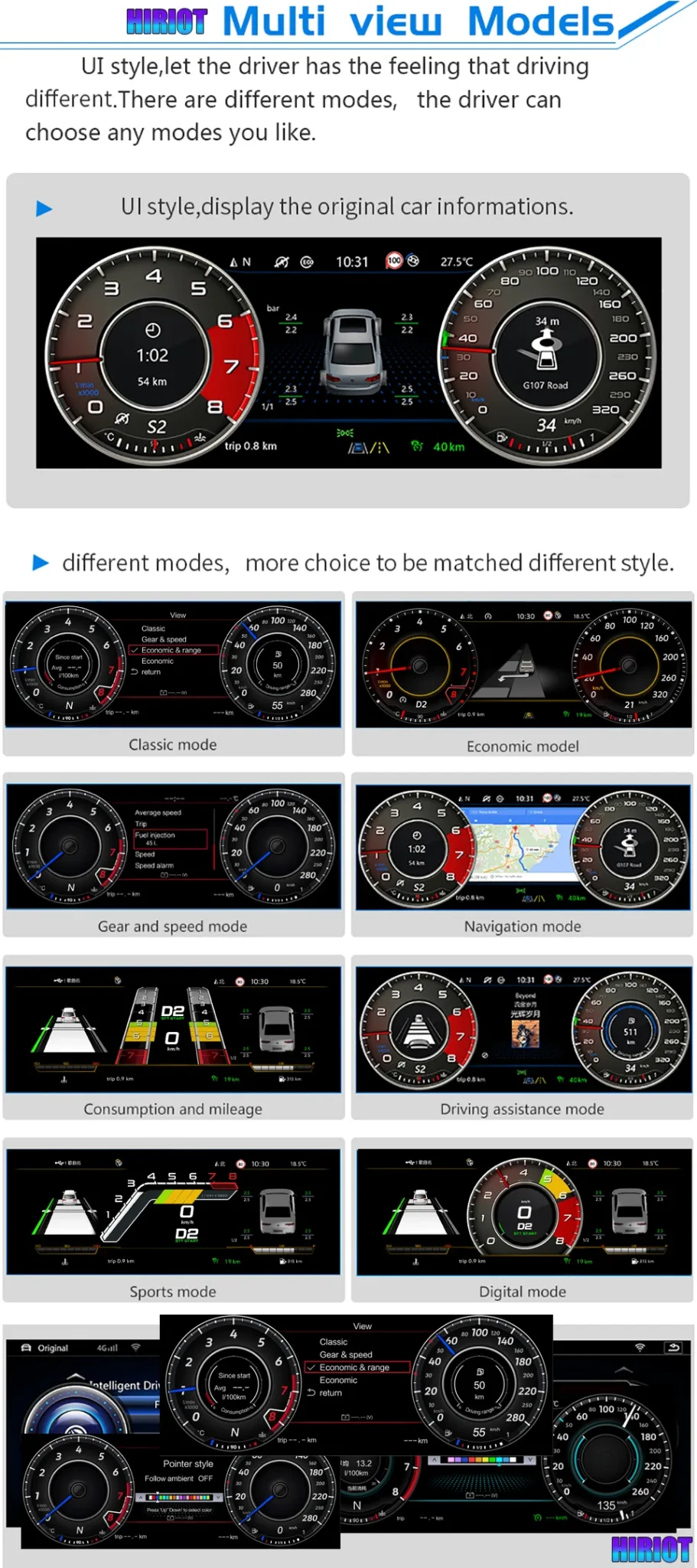
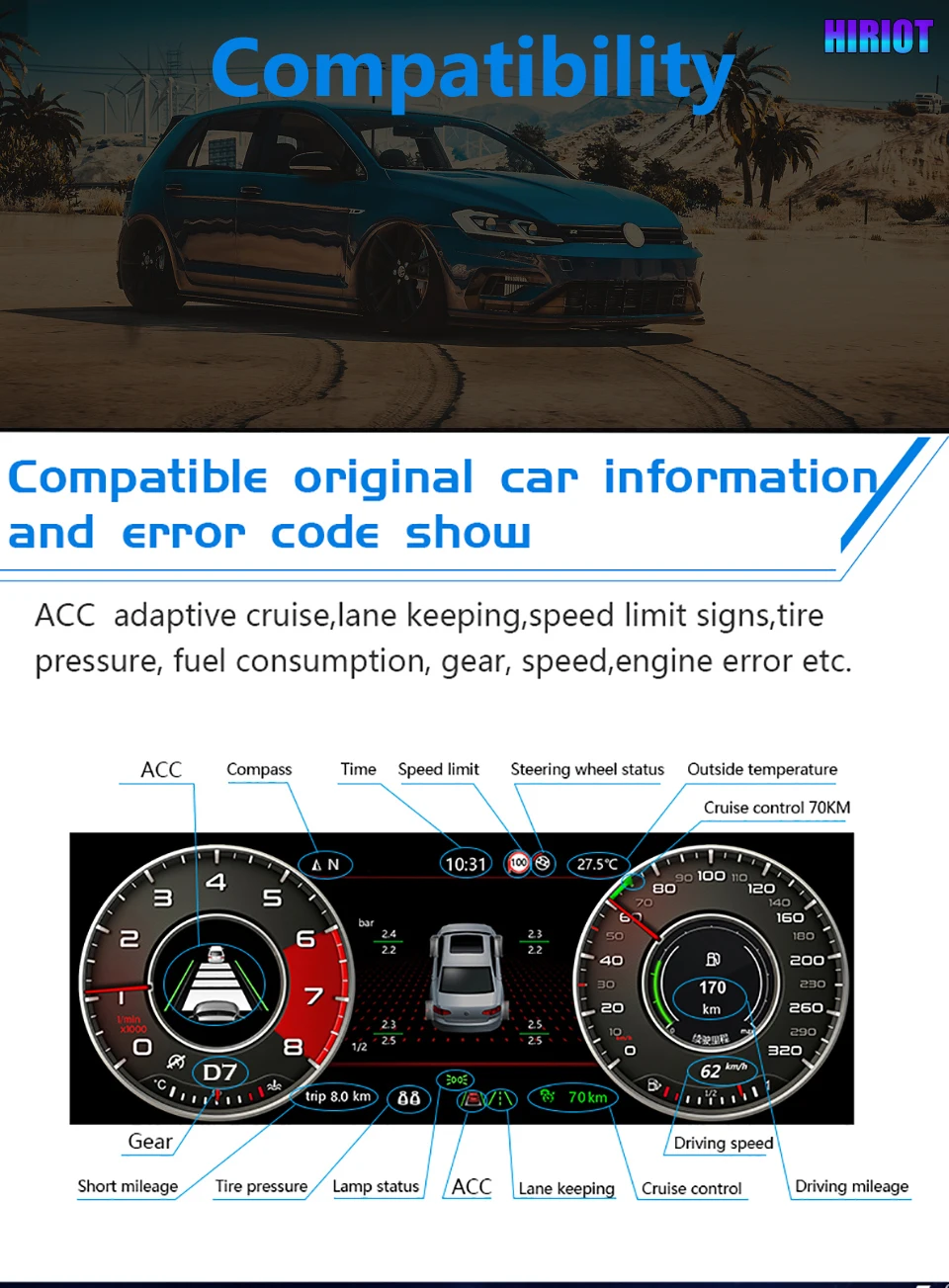
Das VW Golf Mk7 Digital-Kombiinstrument ist ein Linux-basiertes 12.3-Zoll-LCD-Kombiinstrument-Retrofit für unterstützte Volkswagen Golf 7 / Mk7 / Mk7.5-Fahrzeuge und ausgewählte MQB-Modelle nach Bestätigung der Version. Es verbessert den werkseitigen Fahrerinformationsbereich mit klarerer digitaler Geschwindigkeit, Drehzahl, Fahrdaten, Warninformationen, Themenstilen und unterstützten Fahrzeugdaten. Die Original-Lenkradbedienung und Fahrzeuginformationen bleiben nach korrektem Einbau über die passende Fahrzeugschnittstelle erhalten. Für Karten-, Kamera- oder CarPlay-bezogene Bildschirmanzeigen hängt der tatsächliche Unterstützungsumfang vom gekoppelten System und der bestätigten Konfiguration ab; daher prüft iKAGOO vor dem Versand Ihr Fahrzeug und den Verbindungsweg.
Passform vor dem Versand geprüft
Golf 7, Golf Mk7, Golf Mk7.5, GTI- und R-Modelle können sich je nach Baujahr, Armaturenbrett-Ausführung, LHD/RHD-Layout und Original-Kombiinstrument-Version unterscheiden. iKAGOO bereitet die Bestellung nicht allein anhand der Modellbezeichnung vor.
Dediziertes Kombiinstrument, kein generisches Tablet
Dabei handelt es sich um ein dediziertes Kombiinstrument-Upgrade, nicht um einen universellen Android-Bildschirm, der hinter dem Lenkrad platziert wird. Das Linux-System wird für einen schnellen Start und ein stabiles Anzeigeverhalten verwendet.
Kein vorsätzliches Durchtrennen von Kabeln
Für unterstützte Fahrzeuge basiert der Installationsweg auf abgestimmter Verkabelung und Fahrzeugschnittstellenverbindung. Vorherige Aftermarket-Modifikationen oder ungewöhnliche Steckverbinder sollten vor der Installation iKAGOO gezeigt werden.
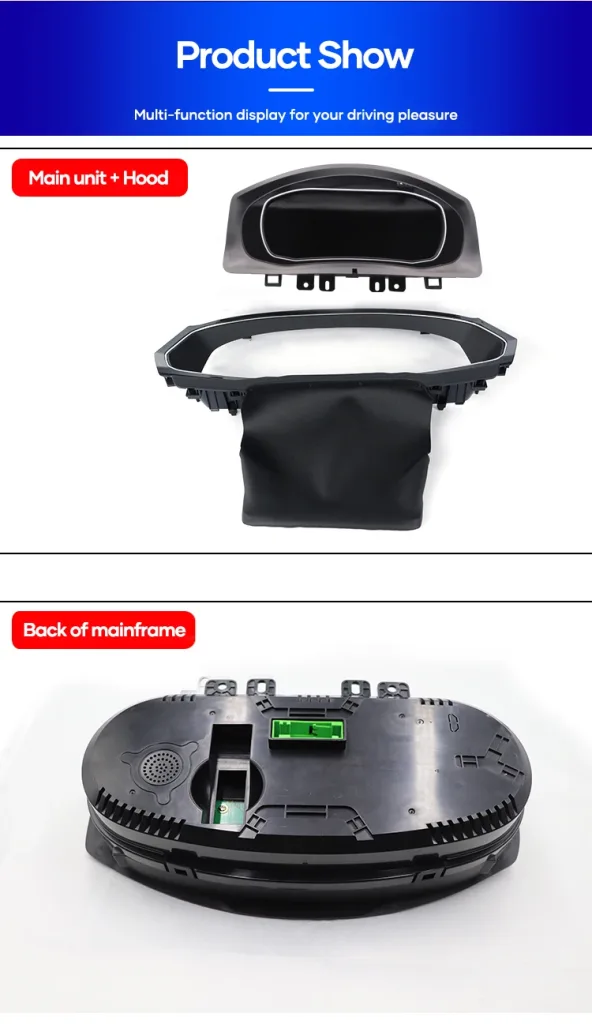
Echtes Display, Gehäuse- und Schnittstellendetails
Diese Produktansichten helfen Ihnen zu verstehen, wie das VW Golf Mk7 Digital Cluster die Fahreranzeige verändert, wie das Gehäuse in den Armaturenbrettbereich passt und warum der Kabelweg vor dem Versand abgestimmt werden muss.
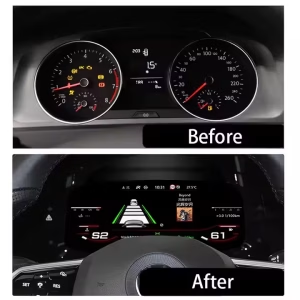
Vorher-Nachher-Cockpit-Änderung
Das alte analoge Display wird durch ein breiteres digitales Layout ersetzt, das die Fahrdaten leichter lesbar macht. Für den täglichen Pendelverkehr, lange Fahrten und Nachtfahrten fühlt sich der Innenraum moderner an, ohne die grundlegende Position des Volkswagen-Armaturenbretts zu verändern.

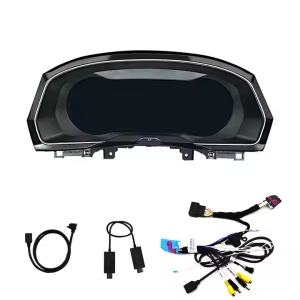
Fahrzeugspezifische Verkabelung und Schnittstellenvorbereitung
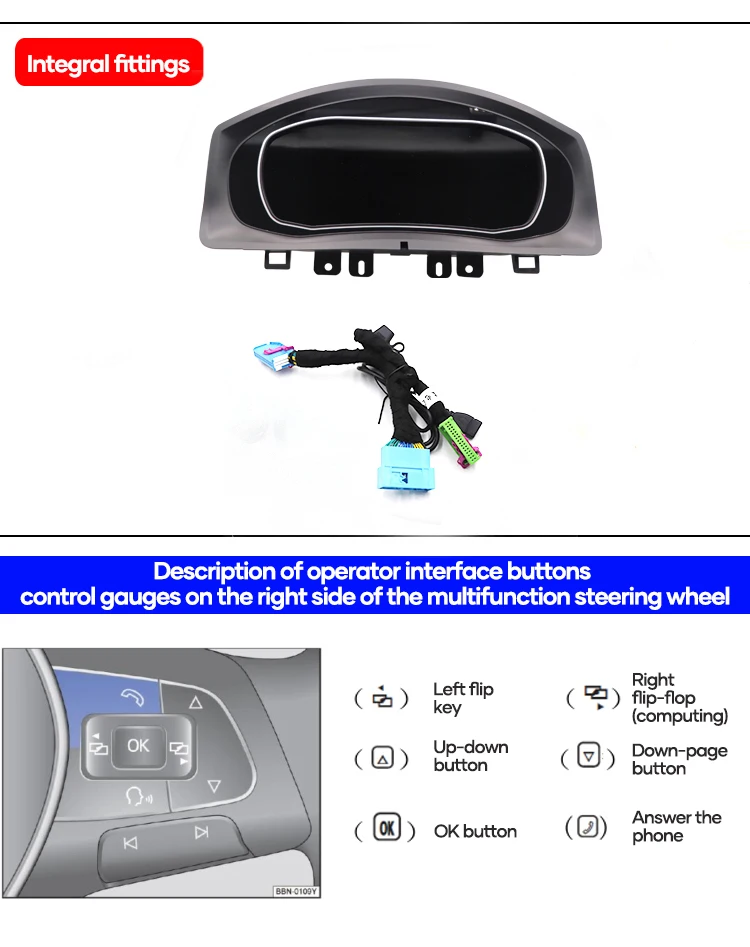
Das Kombiinstrument wird für unterstützte Installationen mit fahrzeugspezifischer Verkabelung und zugehörigen Schnittstellenteilen geliefert. Der korrekte Kabelbaum verringert das Risiko von Fehlverbindungen und hilft dem Gerät, mit dem Fahrzeug zu kommunizieren.

Die Lenkradbedienung bleibt weiterhin vertraut
Die ursprüngliche Logik der Multifunktions-Lenkradbedienung bleibt nach korrektem Anschluss und Einrichtung erhalten. Dadurch bleibt die tägliche Bedienung vertraut, um Seiten zu wechseln, Auswahlen zu bestätigen und unterstützte Menüs des Kombiinstruments zu nutzen.
Verschiedene Anzeigethemen für den täglichen Fahrbetrieb
Verschiedene Zifferblatt- und Bildschirmlayouts ermöglichen die Wahl eines Anzeigestils, der zu normalem Pendeln, sportlichem Fahren oder navigationsorientierter Nutzung passt. Die aufgeräumtere Anzeige verleiht dem Innenraum ein hochwertigeres Gefühl – sowohl für den Fahrer als auch für die Passagiere.
Navigationsanzeigepfad bei korrekter Konfiguration
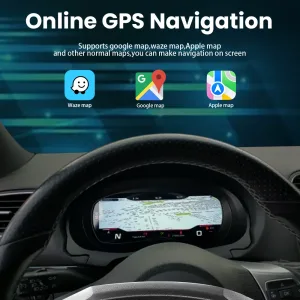
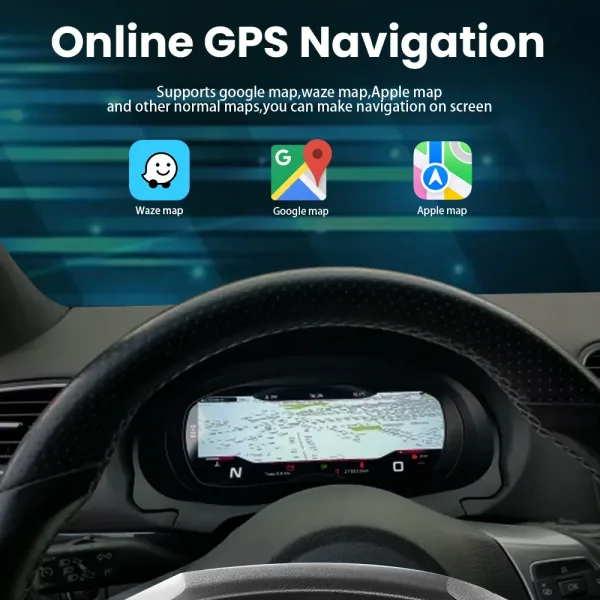
Die Navigationsanzeige kann nützlich sein, wenn das Kombiinstrument mit dem richtigen Eingang und der gekoppelten Systemroute konfiguriert ist. iKAGOO sollte die Navigations-, HDMI- oder Bildschirmprojektionsroute für Ihre genaue Konfiguration vor dem Versand bestätigen.
Unterstützungsroute für CarPlay, Kamera und Bildschirmeingang
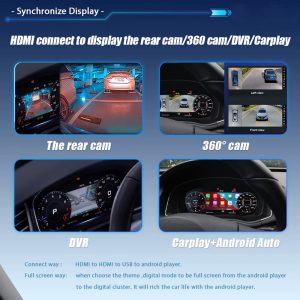
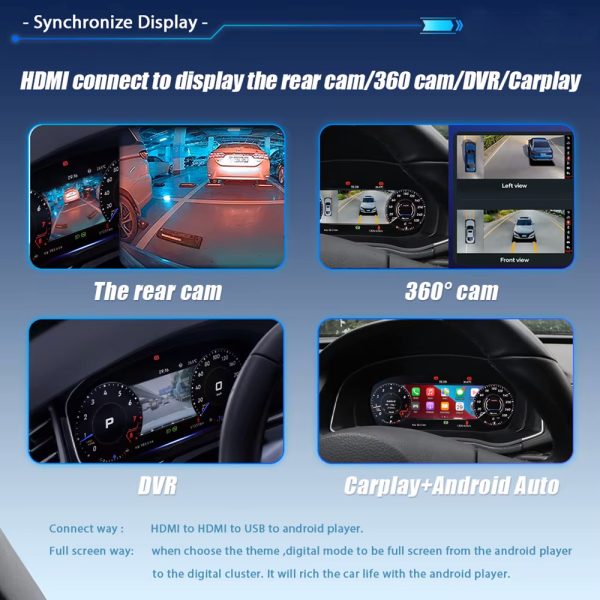
Einige Anzeigefunktionen hängen vom gekoppelten Android-Player, HDMI-Eingangspfad oder der unterstützten Bildschirmprojektionskonfiguration ab. Das Kombiinstrument selbst ist ein dediziertes Linux-Instrumentendisplay, daher sollte die Route vor dem Versand bestätigt werden.
Fahrzeugdaten und Warninformationen bleiben erhalten
Das Upgrade ist so konzipiert, dass weiterhin unterstützte Original-Fahrzeuginformationen über die passende Schnittstelle angezeigt werden. Dies umfasst Geschwindigkeit, Gang, kraftstoffbezogene Daten, Warnanzeigen und andere unterstützte Fahrzeugsignale nach korrekter Installation.
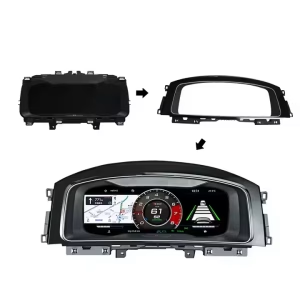
Physisches Gehäuse und Schnittstellenaufbau
Der hintere Anschlussbereich und die passende Struktur sind wichtig, da das Kombiinstrument korrekt in der Position des Fahrer-Dashboards sitzen muss. iKAGOO verwendet Ihre Fahrzeuginformationen, um die richtige Version vorzubereiten.
Schlüsselkonfiguration für das VW Golf Mk7 Digitalcockpit
Dies sind die praktischen Spezifikationen, die vor der Bestellung wichtig sind: Bildschirmgröße, Fahrzeugausrichtung, Systemtyp, Kabelverlegung und erhaltene Fahrzeugfunktionen.
Unterstützung der ursprünglichen Fahrzeugfunktionen nach korrekter Zuordnung
This cluster upgrade is built around the original vehicle communication route. The exact function behavior depends on your vehicle year, original cluster, connector, LHD/RHD layout, factory system and any previous modifications.
Bedienelemente am Lenkrad
Supported multifunction steering-wheel controls continue to operate the cluster after correct connection and configuration.
Fahrzeugdaten
Supported speed, RPM, gear, fuel, mileage and driving information continue through the matched vehicle interface.
Warnhinweise
Supported warning indicators and vehicle status information continue to appear through the cluster communication route.
Display Input Route
Camera, 360-view, CarPlay or map display routes depend on the paired system and confirmed configuration path.
Drei Dinge, die Sie vor dem Kauf prüfen sollten
These iKAGOO standards explain upgrade value, factory-function retention and the right installation path for this VW Golf Mk7 Digital Cluster.
Notwendigkeit eines Upgrades
This score explains why the upgrade makes sense for daily use, not only whether the dashboard looks modern.
- The instrument cluster is the driver’s most-used display area.
- The 12.3-inch LCD gives clearer digital driving information.
- It is more complete than a basic CarPlay-only module because it changes the driver cockpit display.
Kompatibilität mit Originalfahrzeugen
A score of 95/100 does not mean that 5% of factory functions are lost. It explains the matching route, control retention and vehicle-specific preparation.
- Supported vehicle data and warnings continue through the matched route.
- Steering-wheel controls continue through the supported control path.
- Matched wiring reduces wrong-connection risk before international shipment.
Schwierigkeitsgrad der Installation
This level is suitable for experienced DIY installers or an automotive electronics installer.
- Requires careful trim and cluster removal.
- Requires matched wiring connection and vehicle-interface setup.
- No intentional cutting of supported factory wiring is planned for supported installations.
Correct Version Preparation Matters More Than a Cheap Listing Photo
Digital clusters are not selected by model name alone. iKAGOO prepares the version around vehicle year, dashboard layout, factory cluster, connector, LHD/RHD position and your requested display route.
Vehicle Details Checked
You send the model year, dashboard photo, current instrument cluster photo, steering wheel photo and connector details when needed. This helps iKAGOO prepare the correct screen and interface path.
Harness and Interface Prepared
The matched wiring route is important for steering controls, vehicle data and supported warning information. The goal is a cleaner connection path without intentionally cutting supported factory wiring.
Kundendienst nach der Zahlung
After the order, iKAGOO can review setup issues, wiring photos, videos, version information and function behavior. Cases beyond normal setup can enter engineer-level judgment.
How iKAGOO Supports This Upgrade After Payment
The order process is built to reduce wrong-version risk, prepare the correct vehicle-specific parts and give your installer a usable support route if the vehicle has a special configuration.
Auftragsdatensatz angelegt
Your order number becomes the reference for vehicle review, packing, delivery and support.
Fahrzeugbewertung
iKAGOO checks your model year, dashboard layout, LHD/RHD position and current cluster information.
Correct Version Prepared
The screen, harness, interface and configuration route are prepared according to the vehicle information.
Produktfotos auf Anfrage
If requested before packing, you can ask to see actual visible parts prepared for your order.
Verpackung und Versand
After confirmation, the order is packed and dispatched with tracked international delivery.
Nachverfolgung und Nachbetreuung
Tracking may update through international and local carriers. iKAGOO can request logistics updates if needed.
Unterstützung bei der Installation
If your installer needs help, iKAGOO may request photos, videos, wiring status and function test results.
Eskalation durch Ingenieure
Cases beyond normal setup can be escalated with useful evidence for technical judgment.
Software or Settings Path
If settings, firmware or configuration guidance is involved, iKAGOO coordinates the suitable technical route after confirmation.
Kabel- oder Zubehörproblem
If a confirmed cable or accessory problem appears, iKAGOO helps arrange the approved solution or replacement route.
Hardware Compatibility Case
If confirmed hardware incompatibility remains after checks, iKAGOO follows the applicable order and return policy for the device itself.
Nachdem es funktioniert hat
You can still contact iKAGOO for applicable maintenance, setup, update or troubleshooting guidance.
Why This Route Makes More Sense Than a Generic Dashboard Fix
The right choice depends on whether you only want the old display repaired, a phone connection added, or a real driver-display upgrade.
Den alten Cluster reparieren
Repair may keep the car original, but it does not modernize the cockpit or add a wider digital driver information layout. It can be reasonable for collectors, but less attractive for daily-use upgrades.
Cheap Universal Screen
A universal product may look cheaper at first, but it often creates fitment, wiring and support uncertainty. The risk is higher when the product is selected only from a photo instead of vehicle details.
iKAGOO VW Golf Mk7 Digital Cluster
This route focuses on a vehicle-specific instrument display, matched wiring, retained controls and pre-shipment fitment review. It is the better direction for owners who want a cleaner Golf Mk7 cockpit upgrade with support after purchase.
Vor dem Versand
- Fahrzeugmodell und Modelljahr
- Golf 7 / Mk7 / Mk7.5 / GTI / R identification
- LHD or RHD position
- Dashboard and current cluster photos
- Anschlussfotos falls angefordert
Vor der Installation
- Check all visible connectors
- Confirm the matched harness route
- Test steering-wheel controls before final assembly
- Test warning information and vehicle data
- Stop if any plug shape is not correct
Nach der Installation
- Test speed, RPM, fuel and gear display
- Test warning indicators
- Test theme switching and cluster menus
- Check navigation or input route if configured
- Send video to iKAGOO if support is needed
Order Protection and Support References
These links help buyers verify how iKAGOO handles compatibility, installation preparation, warranty coverage, returns and long-term support before ordering.
Kompatibilität und Installation
Review how iKAGOO checks vehicle details, installation conditions and supported retrofit routes before shipment.
Read Compatibility and InstallationGarantiebestimmungen
Check the warranty terms for eligible hardware, support process and order-number reference requirements.
Garantiebestimmungen lesenRefunds and Returns
Review the return route, confirmed compatibility cases and order-protection conditions before installation.
Read Refund and ReturnsHäufig gestellte Fragen
These answers are written for Golf Mk7 owners who want to avoid wrong-version ordering, unclear installation routes and unsupported function expectations.
Will this VW Golf Mk7 Digital Cluster fit my exact car?
It depends. The main direction is Golf 7 / Golf Mk7 / Golf Mk7.5, but final fitment depends on your vehicle year, dashboard layout, LHD/RHD position, original cluster and connector route. Send clear photos before shipment so iKAGOO can prepare the correct version.
Is this only for Golf Mk7, or also for Passat B8 and Arteon?
It depends. Golf Mk7 is the primary page direction, while Passat B8 and Arteon should be handled as confirmed MQB-related applications. iKAGOO checks dashboard structure and connector information before treating those vehicles as supported for your order.
Funktionieren die originalen Lenkradbedienelemente weiterhin?
Yes, after correct matching and connection. Supported multifunction steering-wheel controls continue through the matched vehicle interface. Final behavior should be tested before the dashboard is fully reassembled.
Will vehicle data and warning information still show?
Yes, supported vehicle data and warning information continue through the cluster communication route after correct installation. This includes core driving information such as speed, RPM, gear, fuel-related data and supported warning status.
Does it support map navigation or CarPlay display?
It depends. The cluster is a dedicated Linux instrument display and does not run Android apps by itself. Map, CarPlay, Android Auto, camera or 360-view display depends on the paired system, HDMI or screen-projection route and the confirmed configuration.
Muss ich die werkseitige Verkabelung durchtrennen?
No, supported installations are prepared around a matched wiring route without intentional cutting of supported factory wiring. If your vehicle has previous aftermarket wiring, damaged plugs or non-standard connectors, stop and contact iKAGOO before continuing.
Eignet es sich für die Selbstmontage?
It depends. The iKAGOO Installation Ease Level is Level 3 — Advanced DIY. It is suitable for experienced DIY installers or an automotive electronics installer who can remove trim carefully, connect the matched harness and complete full function testing.
Does it require ODIS or dealer coding?
It depends on the vehicle and configuration. Many supported functions work through the matched cluster and interface route, but special configurations may need setup guidance. iKAGOO reviews your vehicle details so the correct support path is prepared before shipment.
Was muss ich vor dem Versand schicken?
Send the vehicle model, model year, dashboard photo, current instrument cluster photo, steering-wheel photo, LHD/RHD information and connector photos if requested. These details help iKAGOO prepare the correct version instead of relying only on the vehicle badge name.
Warum bei iKAGOO kaufen statt bei einem günstigeren No-Name-Gerät?
Because the real risk is not only price; it is ordering the wrong version, receiving the wrong harness or having no support after installation starts. iKAGOO provides vehicle review, version preparation, tracked delivery and practical installation support for this VW Golf Mk7 Digital Cluster upgrade.
Kann ich vor dem Verpacken um aktuelle Produktfotos bitten?
Yes, if requested before packing. You can ask iKAGOO to show visible prepared parts, harnesses or related accessories before dispatch. This helps you and your installer feel more confident before international shipping begins.
Was passiert, wenn mein Installateur ein Problem mit einem Kabel oder einer Einstellung feststellt?
Contact iKAGOO with clear photos, videos, connector status and a description of the function that is not working. iKAGOO uses that information to check wiring, settings, CANBUS route, cluster version and whether engineer-level review is needed.
Choose This Upgrade If You Want a Real Driver-Cockpit Change
The VW Golf Mk7 Digital Cluster is for owners who want the instrument area to feel newer, clearer and more useful every day. It is strongest when the buyer provides accurate vehicle information, iKAGOO prepares the correct version, and the installer completes full function testing before final assembly.


James.Parker -
Installiert das iKagoo digitale Kombiinstrument in meinem 2015 Golf 7. Die Installation war unkompliziert, und das Display sieht modern aus. Die kabellose CarPlay Integration funktioniert nahtlos, und die anpassbaren Themes verleihen eine persönliche Note. Insgesamt ein lohnendes Upgrade.