


BMW X3 F25 Upgrade-Guide 2011–2017: Sollten Sie den Bildschirm, das digitale Cluster oder beides aufrüsten?
BMW X3 F25 Upgrade-Guide: Bildschirm, digitales Cockpit oder beides?
Wenn Ihr F25 noch so fährt, wie Sie es möchten, sind ein alter Bildschirm oder ein analoges Instrumentenpanel kein guter Grund, den gesamten BMW zu ersetzen. Die nützliche Entscheidung ist einfacher: Welcher Teil des Innenraums lässt das Auto jetzt bei jeder Nutzung älter wirken?
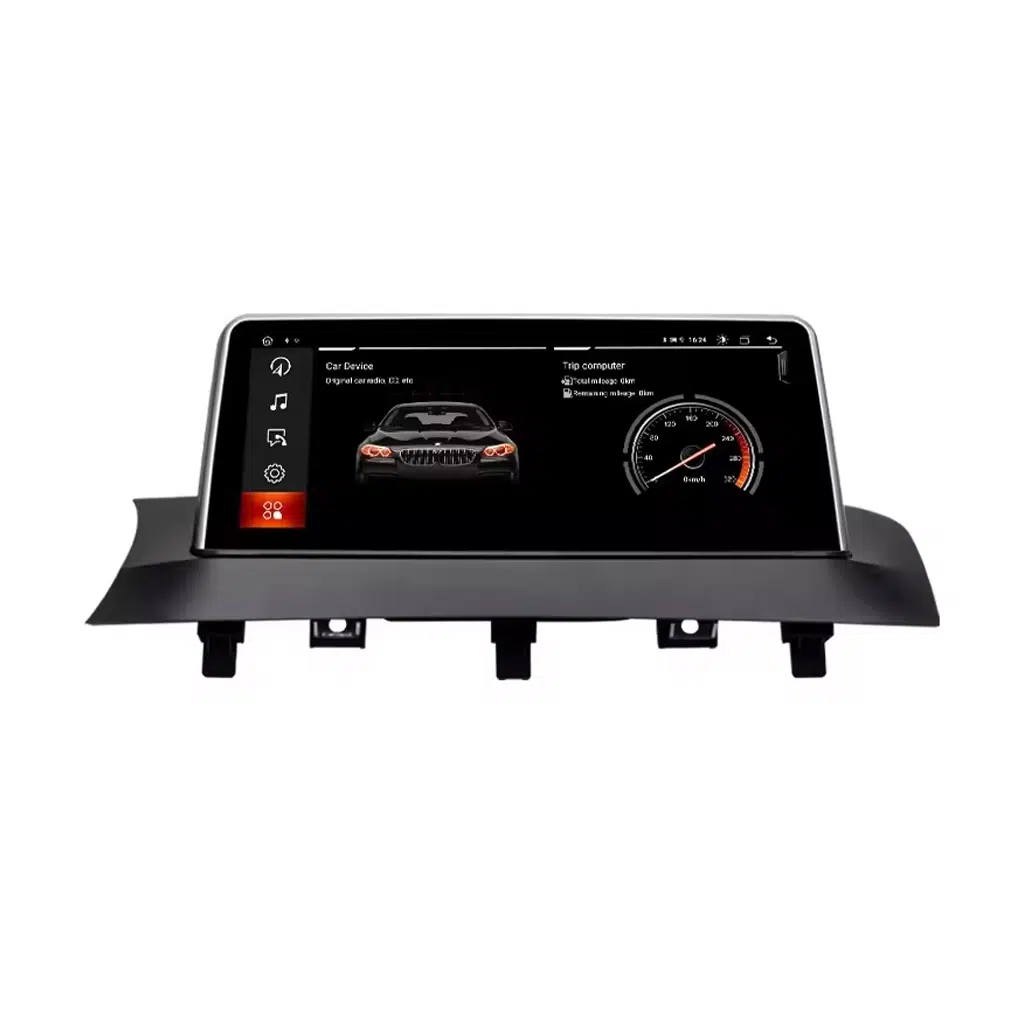
Wenn Navigation, Telefonnutzung und das Zentraldisplay die Frustration sind, beginnen Sie mit dem Android-Bildschirm. Wenn das Zentralsystem akzeptabel ist, aber die Sicht durch das Lenkrad veraltet wirkt, beginnen Sie mit dem digitalen Cockpit. Wenn beide Bereiche Sie stören und Sie den X3 behalten möchten, kann ein Upgrade beider ein konsistenteres modernes Cockpit schaffen.
BMW X3 F25 Upgrade-Guide: Was sollten Sie zuerst aufrüsten?
Der richtige erste Kauf wird nicht dadurch bestimmt, welches Produkt die längste Funktionsliste hat. Er wird dadurch bestimmt, welchen Teil Ihres BMW Sie bei jeder Fahrt aus dem falschen Grund bemerken.
Wählen Sie diese Route, wenn Ihre tägliche Frustration die alte iDrive-Darstellung, begrenzte Telefonintegration, ein kleines Originaldisplay oder die Abhängigkeit von einem separaten Telefon für die Navigation ist.
- Kabelloses Apple CarPlay
- Android-Auto
- Navigation und Android-Mediafunktionen
- Beibehaltene Original-Bedienelemente auf der passenden Route
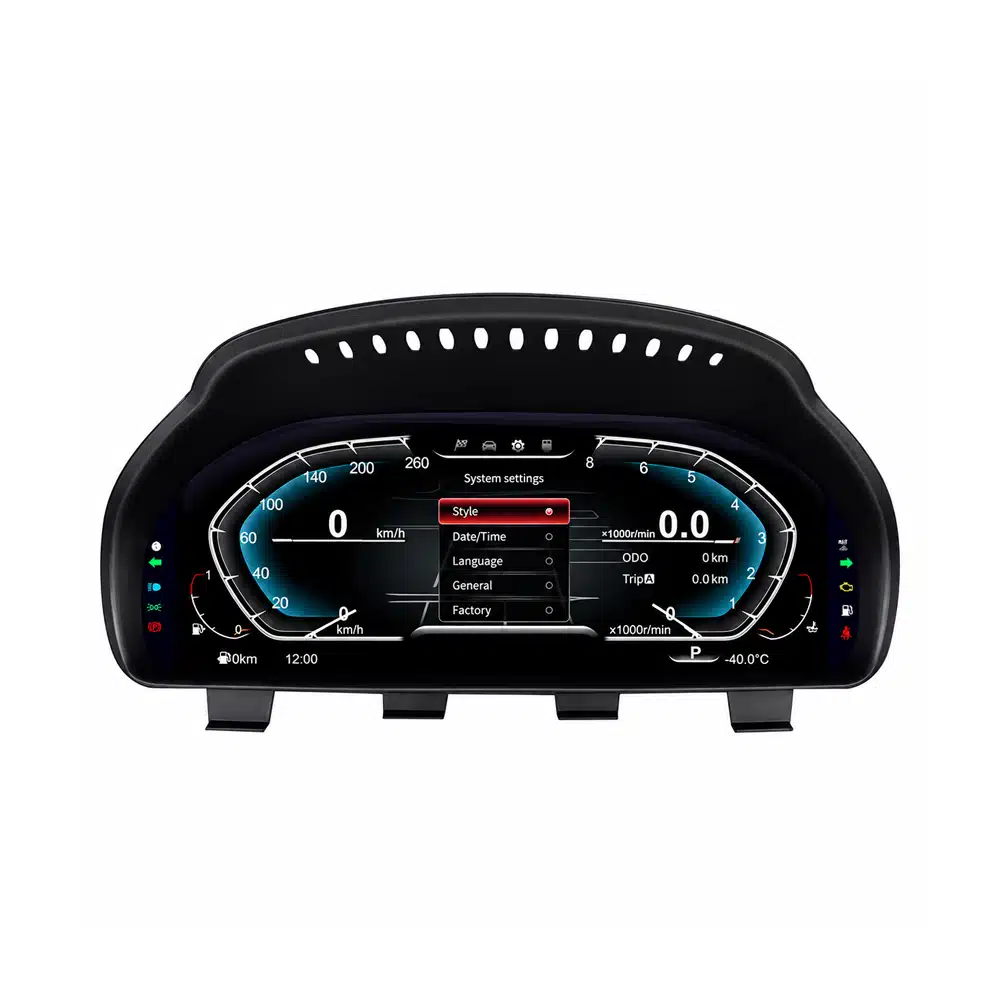
Wählen Sie diese Route, wenn die hauptsächliche visuelle Lücke direkt hinter dem Lenkrad liegt. Das 12.3-Zoll-Cockpit modernisiert den Informationsbereich, den Sie bei jeder Fahrt ansehen.
- 12.3-Zoll 1920×720 IPS-Display
- Apple CarPlay und Android Auto
- Mehrere digitale Instrumenten-Designs
- Unterstützte originale BMW-Fahrinformationen
Der Vorteil, beides zu tun, ist nicht einfach, zwei Bildschirme zu haben. Es ist visuelle Konsistenz: die Mitte des Armaturenbretts und die Sicht des Fahrers wirken nicht länger, als gehörten sie zu zwei verschiedenen Epochen.
- Moderne Telefonintegration im zentralen Display
- Moderner fahrerorientierter digitaler Cockpit
- Ein Fahrzeug mit einer Support-Historie
- Ein stärkeres langfristiges Upgrade für Besitzer
BMW X3 F25 Upgrade-Guide: 2011–2017 Modellnamen in den USA, Europa, UK und anderen Märkten
Der wichtige Identifikator für diesen Artikel ist BMW X3 Generation F25. Motor- und Antriebsstrang-Badges variieren je nach Land und Modelljahr. Ein Badge wie xDrive28i oder xDrive20d ersetzt nicht die Notwendigkeit, die ursprüngliche Bildschirm- und Elektronikkonfiguration zu bestätigen.
| Markt / Häufiger Suchname | Generation | Häufige F25-Badges | Für diesen Guide relevante Jahre | Was für das Upgrade wichtig ist |
|---|---|---|---|---|
|
Vereinigte Staaten / Kanada BMW X3 / BMW X3 SAV |
F25 | xDrive28i, xDrive35i, später sDrive28i und xDrive28d je nach Modelljahr | 2011–2017 | F25-Chassis und ursprüngliches CIC/NBT-Bildschirmsystem bestätigen. |
|
Vereinigtes Königreich / Europa BMW X3 |
F25 | sDrive18d, xDrive20d, xDrive30d, xDrive35d, sDrive20i, xDrive20i, xDrive28i, xDrive35i je nach Land und Jahr | 2011–2017 | Motor-Badge ist zweitrangig; ursprüngliches Infotainment und Fahrzeugkonfiguration sind die wichtigsten Prüfpunkte. |
|
Australien / Neuseeland / Naher Osten / Asien BMW X3 |
F25 | Lokale Benzin- und Diesel-sDrive-/xDrive-Varianten aus derselben F25-Familie | 2011–2017 | Bestätigen Sie F25-Generation, Lenkposition und Originalbildschirm/Cluster vor dem Versand. |
BMW X3 F25 Upgrade-Leitfaden: Wenn der Center-Bildschirm das Teil ist, das Ihnen zuerst auffällt
Sie mögen vielleicht immer noch die Sitzposition, die Lenkung, die Praktikabilität und die Art, wie der F25 fährt. Dann beginnen Sie eine Fahrt und die Alterslücke wird offensichtlich: das Telefon übernimmt Karten, Musik und Anrufe, während das Werksdisplay immer weniger beiträgt.
Ein modernes Center-Display verändert die Routine, nicht nur das Aussehen. Wireless CarPlay oder Android Auto bringt die Funktionen, die Sie bereits nutzen, ins Armaturenbrett, während das Android-System eine größere moderne Oberfläche für Navigation und Medien bietet.
Der Grund zu kaufen ist nicht “ein größerer Bildschirm.” Der Grund ist, dass der BMW jeden einzelnen Tag einfacher zu bedienen wird, ohne das Fahrzeug zu ersetzen, das Sie bereits kennen.
Ja. Der aktuelle iKAGOO F25 Android-Bildschirm-Pfad unterstützt Wireless Apple CarPlay und Android Auto, nachdem das originale BMW-System korrekt abgeglichen wurde.
Dieser Pfad macht am meisten Sinn, wenn das Problem, das Sie lösen möchten, Telefonintegration, Navigation und Center-Display-Nutzbarkeit ist.
Es ist der stärkere Pfad, wenn Sie mehr als nur Telefonprojektion wollen und das originale Center-Display selbst Teil dessen ist, was das Auto veraltet wirken lässt.
Eine vollständige Android-Head-Unit ändert die Größe und Präsentation der Oberfläche sowie das Hinzufügen moderner Telefonintegration. Ein einfacher Adapter kann ausreichen, wenn Sie mit dem Originalbildschirm völlig zufrieden sind.
BMW X3 F25 Upgrade-Leitfaden: Wenn das Instrumentencluster das Cockpit alt wirken lässt
Das ist ein anderer Kaufgrund als das Ersetzen des Center-Bildschirms. Das Instrumentencluster befindet sich in Ihrem direkten Sichtfeld, daher verändert eine Änderung den Teil des Cockpits, den Sie auf jeder Fahrt natürlich sehen.
Das aktuelle iKAGOO F25-Cluster verwendet ein 12.3-Zoll 1920×720 IPS-Display, unterstützt Apple CarPlay und Android Auto, bietet mehrere Instrumententhemen und behält unterstützte originale BMW-Fahrinformationen bei.
Sie müssen nicht das Center-Display ersetzen, nur weil Sie eine modernere digitale Fahrerfahrung wünschen. Wenn der Instrumentenbereich das Problem ist, lösen Sie zuerst diesen Bereich.

Yes, when the analog instrument area is the part of the cabin that now feels older than the rest of the BMW.
The upgrade affects the visual area you see on every drive rather than adding a feature you only use occasionally.
Yes. The current iKAGOO BMW X3 F25 Digital Cluster supports both Apple CarPlay and Android Auto.
This is useful for owners who want a modern driver-facing digital experience without necessarily replacing the center infotainment screen at the same time.
BMW X3 F25 Upgrade Guide: When Upgrading Both Screens Makes More Sense
Doing both is not necessary for every owner. It becomes more compelling when you expect to keep the F25 for several more years and both the center display and analog driver display now make the cabin feel older than the rest of the vehicle.
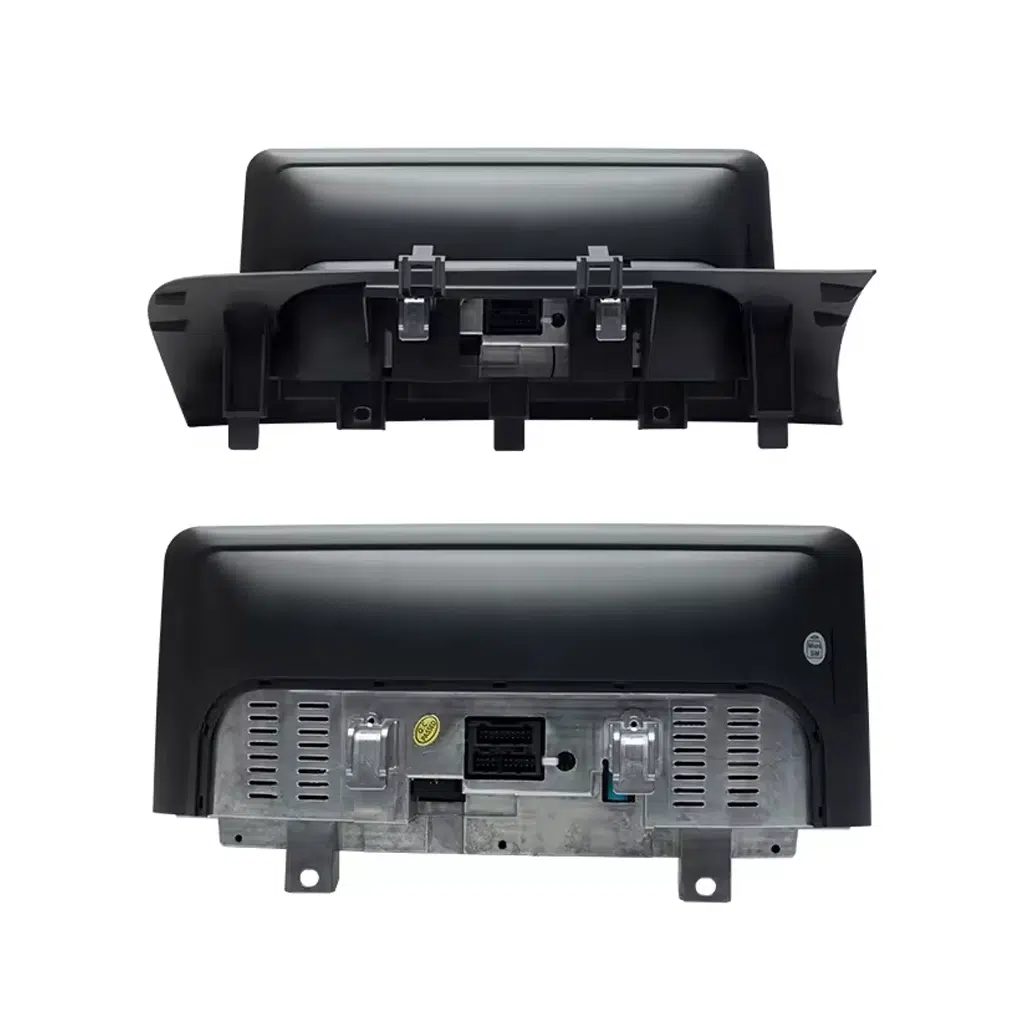
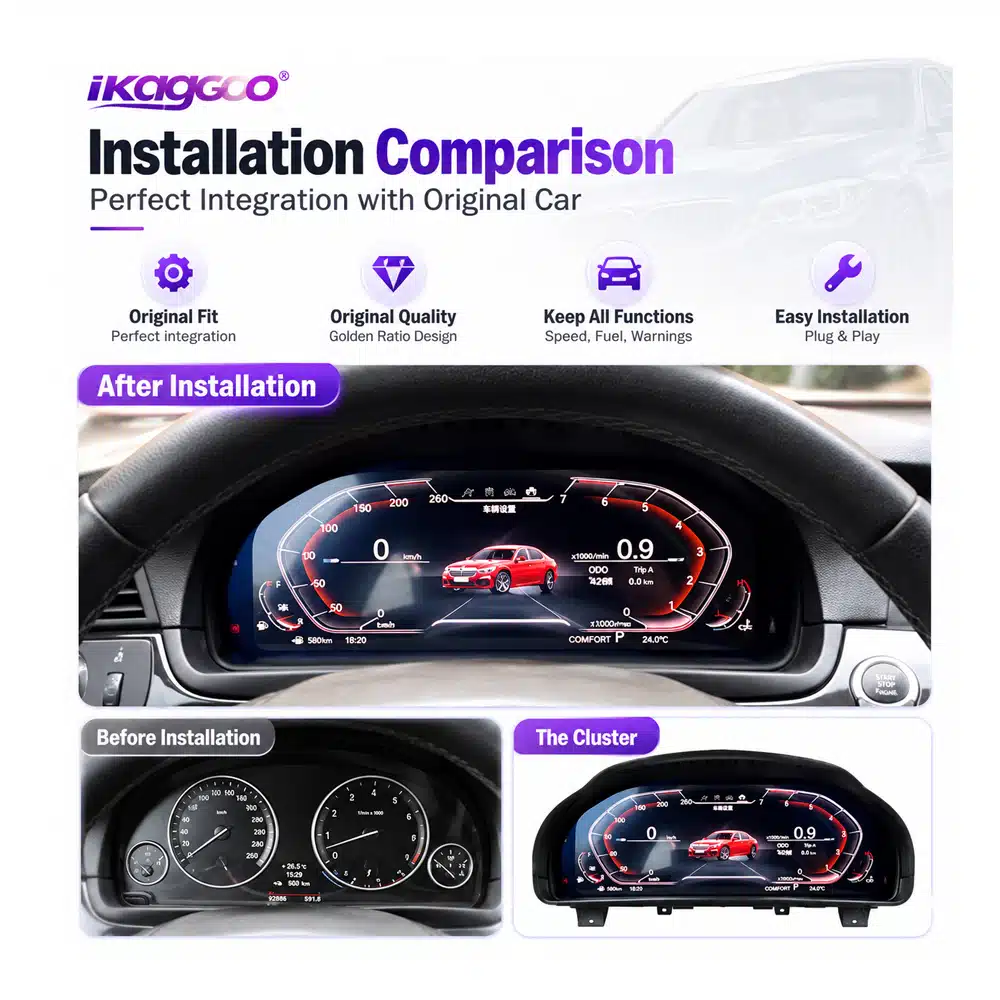
If only one side of the cockpit is modernized, the other can become more noticeable. When both areas already bother you, upgrading the center display and cluster can make the dashboard feel like one coherent interior again.
This is particularly relevant for an owner who bought a good used F25, knows the vehicle is mechanically worth keeping and wants to improve the parts experienced on every journey.
BMW X3 F25 Upgrade Guide: What Should You Change First After Buying a Used X3?
Start with the Android screen. It changes navigation, phone integration, music and the interface you interact with during normal driving.
Start with the digital cluster. It changes the visual area directly in front of you without requiring you to replace a center screen you still like.
Upgrade in stages or complete both areas. The right order is the one that solves your biggest current frustration first.
BMW X3 F25 Upgrade Guide: Four Risks to Solve Before You Spend the Money
A low advertised product price is not automatically the lowest final cost if fitment, customs charges, installation support and future repair options are still unknown.
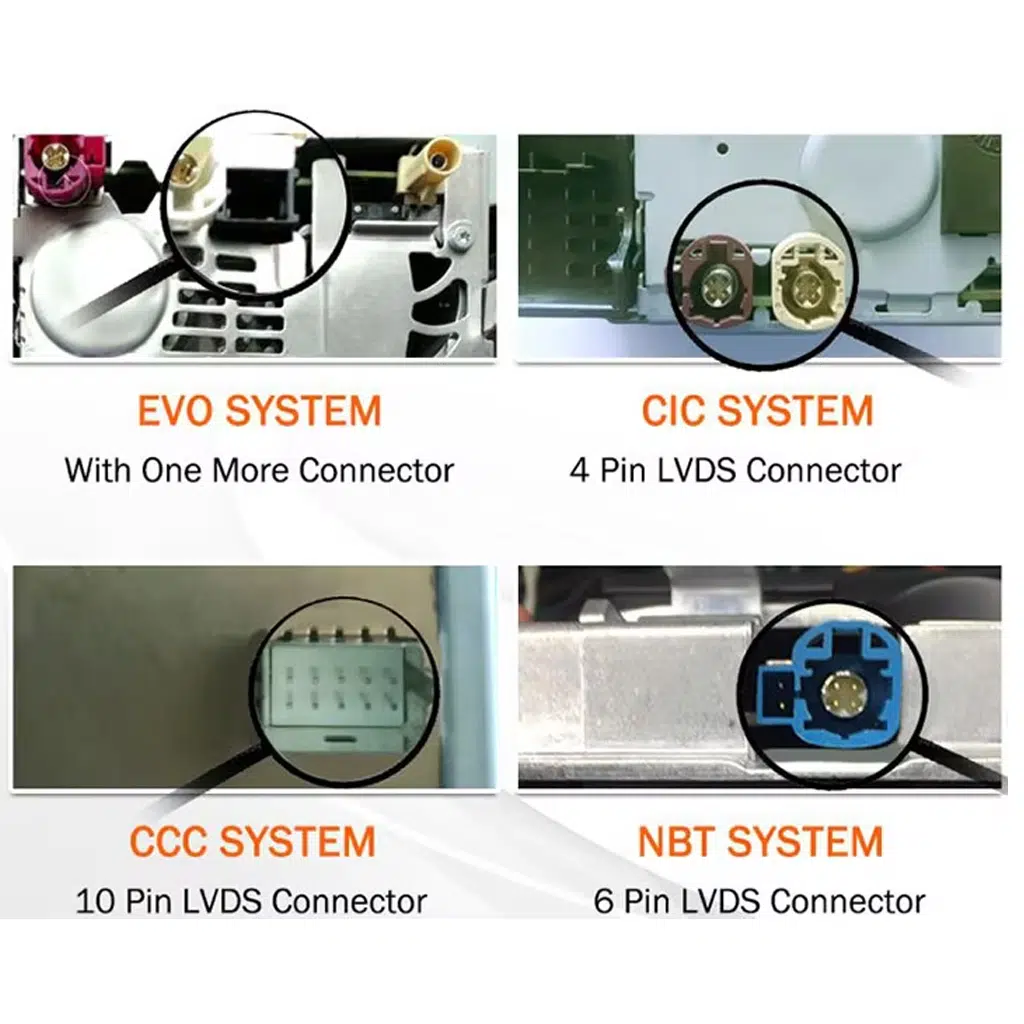
Confirm the year, F25 platform and original CIC/NBT or instrument configuration before shipment.
For eligible destinations, select the DDP tax-included shipping route when it is available at checkout.
Product identification and vehicle information stay connected to the original order.
The support relationship does not simply disappear when the 12-month hardware period ends.
BMW X3 F25 Upgrade Guide: How DDP Shipping Can Remove the Customs Surprise
You have already decided to spend money improving the BMW. The last thing you want is a courier message after shipment asking for another unexpected import payment before delivery.
For an eligible DDP route that is expressly selected or confirmed before shipment, the supported import duties and applicable tax/VAT covered by that route are included in the agreed shipping arrangement.
This gives the buyer a clearer idea of the real landed cost instead of comparing only the product price and leaving customs as an unknown amount at the destination.
DDP applies only when the tax-included option is clearly offered and selected at checkout or confirmed by iKAGOO before shipment.
If DDP is not expressly selected or confirmed, standard-shipping import charges remain the customer's responsibility.
DDP availability can depend on destination, order value, package size and available logistics route.
BMW X3 F25 Upgrade Guide: What Happens If the Screen or Cluster Has a Problem Years Later?
No responsible automotive-electronics seller can promise that hardware will never fail. The more important question is whether your original product can still be identified and whether there is still a practical route to software help, parts or an upgrade later.
Eligible products use iKAGOO's current 12-month limited commercial hardware warranty, subject to the warranty terms.
Original purchasers of eligible products receive remote software troubleshooting, recovery guidance and compatible available software support.
iKAGOO helps assess compatible parts, repair routes or newer compatible solutions. Parts, shipping and physical repair may be chargeable.
If a screen stops working two years later, the first question should not automatically be “Where can I buy another complete unit?” The original order can be used to identify the supplied version and help determine whether the issue is software, wiring, display hardware, mainboard hardware or another part of the system.
If a compatible part is needed several years later, iKAGOO's parts-and-upgrade support route can be used to assess available replacement, repair or newer compatible solutions rather than forcing the customer to start again with an unknown product.
BMW X3 F25 Upgrade Guide: Buying for a Family Member, Client or Customer
You do not need to personally identify every BMW electronic option. Start with the exact year and send clear photos of the original screen, dashboard or instrument cluster.
Tell iKAGOO whether the owner mainly wants CarPlay, a larger center display, a digital instrument panel or a complete cockpit upgrade.
Workshops care about more than whether the display powers on. Original controls, camera route, system configuration and complete function testing should be considered before the dashboard is fully reassembled.
Correct product identification also matters later if the customer returns with a software or hardware question.
BMW X3 F25 Upgrade Guide: Three Reasons This Upgrade Path Makes Sense
These three indicators focus on what matters after the excitement of seeing a new display: how much the upgrade changes daily use, how well it can remain connected to the BMW and whether there is still a support route after the sale.
The center screen and instrument cluster are two of the parts you interact with most often. Changing the right one creates a visible benefit on nearly every journey.
Vehicle-specific CIC/NBT review and retained BMW information make the upgrade more meaningful than simply placing a universal display in the cabin.
DDP availability, identifiable hardware, installation support and the 1Y / 3Y / 5Y support framework reduce uncertainty beyond the day of purchase.
BMW X3 F25 Upgrade Guide: Screen, Cluster or Both — Which Route Fits You?
| Your Situation | What You Want to Improve | Recommended Starting Route | Why iKAGOO Adds Value | Nächster Schritt |
|---|---|---|---|---|
| Original center screen feels old or too limited | Navigation, CarPlay, Android Auto, media and everyday phone use | Android-Hauptgerät | CIC/NBT and dashboard review before shipment | View product → |
| Center screen is acceptable but analog gauges make the car feel old | Driver-facing digital cockpit | 12,3-Zoll-Digital-Kombiinstrument | F25-specific route with order-linked support | View product → |
| Both front displays feel dated and you plan to keep the BMW | More consistent modern cockpit | Screen + Cluster | One vehicle, one support route | Confirm both → |
| US or EU buyer concerned about unexpected import charges | More predictable landed cost | Select eligible DDP option | Supported duties/taxes included in confirmed DDP route | Read DDP policy → |
| Keeping the X3 for several more years | A support route if software or hardware needs attention later | Buy through an identifiable long-term supplier | 1Y hardware · 3Y software · 5Y parts/upgrade support | View support policy → |
BMW X3 F25 Upgrade Guide: Compatibility, Installation, Shipping and Long-Term Support
BMW X3 F25 Upgrade Guide: Questions Buyers Ask Before Ordering
BMW X3 F25 Upgrade Guide: What should I upgrade first on a 2011–2017 BMW X3?
Upgrade the part that currently limits your ownership experience most. Choose the Android screen when center-display usability, navigation and phone integration are the problem. Choose the digital cluster when the driver's instrument area is what makes the cabin feel dated.
BMW X3 F25 Upgrade Guide: Does this cover 2011, 2012, 2013, 2014, 2015, 2016 and 2017 models?
Ja. The current iKAGOO X3 F25 routes in this guide cover the 2011–2017 F25 generation, subject to original system and vehicle-configuration confirmation.
BMW X3 F25 Upgrade Guide: Can I add CarPlay to my F25?
Ja. The current F25 Android head unit supports wireless Apple CarPlay, and the current F25 digital cluster also supports Apple CarPlay. Choose the route according to where you want the upgrade to change your driving experience.
BMW X3 F25 Upgrade Guide: Does the digital cluster support Android Auto?
Ja. The current BMW X3 F25 Digital Cluster lists both Apple CarPlay and Android Auto as supported functions.
BMW X3 F25 Upgrade Guide: What is CIC or NBT and why does it matter?
CIC and NBT identify BMW infotainment-system generations that can affect which Android-screen version your vehicle requires. Clear original dashboard and screen photos give iKAGOO a practical basis for checking the correct route.
BMW X3 F25 Upgrade Guide: Should I buy the screen and digital cluster together?
Consider both when you plan to keep the F25 and both the center display and driver's instrument area already feel dated. If only one area bothers you, upgrade that one first rather than replacing a part you still like.
BMW X3 F25 Upgrade Guide: Can I upgrade in stages?
Ja. You can begin with the screen or digital cluster and add the second upgrade later. Starting with the part you interact with most makes the first purchase easier to justify.
BMW X3 F25 Upgrade Guide: Will I have to pay customs duties after delivery?
If an eligible DDP tax-included shipping option is offered and you select it at checkout, the supported import duties and applicable taxes included in that confirmed DDP route are handled as part of the shipping arrangement. If DDP is not selected or confirmed, normal import charges may remain the buyer's responsibility.
BMW X3 F25 Upgrade Guide: Is DDP available for US and European buyers?
iKAGOO currently offers DDP / tax-included routes for eligible United States orders and supported European Union destinations when the option is available and selected. Availability can depend on product, package, destination and current logistics route.
BMW X3 F25 Upgrade Guide: What happens if the product fails after one year?
The end of the 12-month commercial hardware warranty does not automatically end the support relationship. Eligible original purchasers remain connected to the applicable 3-year remote software and 5-year parts / upgrade support routes. Out-of-warranty parts, shipping and physical repair may be chargeable.
BMW X3 F25 Upgrade Guide: Does the five-year support mean a five-year free warranty?
Nr. The hardware warranty, software-support period and parts / upgrade support period are separate commitments. Five-year parts and upgrade support does not mean five years of free replacement hardware.
BMW X3 F25 Upgrade Guide: What if a replacement part is discontinued years later?
iKAGOO can assess a compatible part, repair route or newer compatible product where a practical solution remains available. Long-term support does not guarantee that every discontinued component will remain permanently in stock.
BMW X3 F25 Upgrade Guide: Can a local BMW or car-audio installer fit these products?
An experienced automotive-electronics installer is an appropriate route when professional installation is preferred. Supported controls, audio, cameras and vehicle information should be checked before the dashboard is completely refitted.
BMW X3 F25 Upgrade Guide: What should I send iKAGOO if I am not sure which version I need?
Send the exact vehicle year and clear photos of the original dashboard, screen or cluster. Include steering position and any relevant factory audio, camera or previous aftermarket modifications you know about.
BMW X3 F25 Upgrade Guide: Why buy from iKAGOO instead of the cheapest seller?
Because the lowest product price is not necessarily the lowest ownership cost when fitment, customs, installation and future support are still unknown. iKAGOO combines vehicle review, optional eligible DDP shipping, order-linked technical support and a defined long-term ownership-support route.
BMW X3 F25 Upgrade Guide: Keep the X3 You Still Like and Modernize What Now Feels Old
If your 2011–2017 BMW X3 F25 still gives you the driving position, practicality and ownership experience you want, an outdated display is not a reason by itself to replace the whole vehicle.
Choose the Android head unit when the center screen, navigation and phone experience are what bother you. Choose the digital cluster when the analog driver's view is what dates the cabin. Choose both when you plan to keep the BMW and want the front cockpit to feel consistent again.
Then look beyond the installation day: confirm the vehicle before shipment, choose DDP where available if you want a clearer import-cost route, and buy from a supplier that can still identify the product if you need software, parts or technical help years later.
One BMW. One vehicle history. One support route.








Add comment
Du musst angemeldet sein, um einen Kommentar abzugeben.