


Mercedes S-Klasse W222 NTG5.0 Android-CarPlay-Upgrade: Lohnt es sich?
Bevor Sie Ihr Mercedes S-Klasse W222 NTG5.0 auf Android CarPlay aufrüsten, lesen Sie dies
Dieser Leitfaden richtet sich an W222-Besitzer, die nicht nur eine billige CarPlay-Box möchten. Er erklärt, ob das 12.3-Zoll Android CarPlay-Upgrade den Aufwand wert ist, wie schwierig die Installation wirklich ist, warum die iKAGOO-Bewertung 92/100 für den Upgrade-Wert und 90/100 für die Kompatibilität mit dem Originalfahrzeug beträgt, und wie iKAGOO das Risiko von Fehlversionen und Installationsfehlern vor dem Versand reduziert.
92/100 Starker Upgrade-Grund Kompatibilität mit dem Originalfahrzeug:
90/100 Nahezu-OEM-Weg Installationsfreundlichkeit:
Level 3 fortgeschrittenes DIY
Konzipiert für Käufer, die CarPlay, Android Auto, moderne Navigation und einen S-Class-Innenraum im Werksstil möchten – ohne die falsche NTG5.0-Route zu wählen.
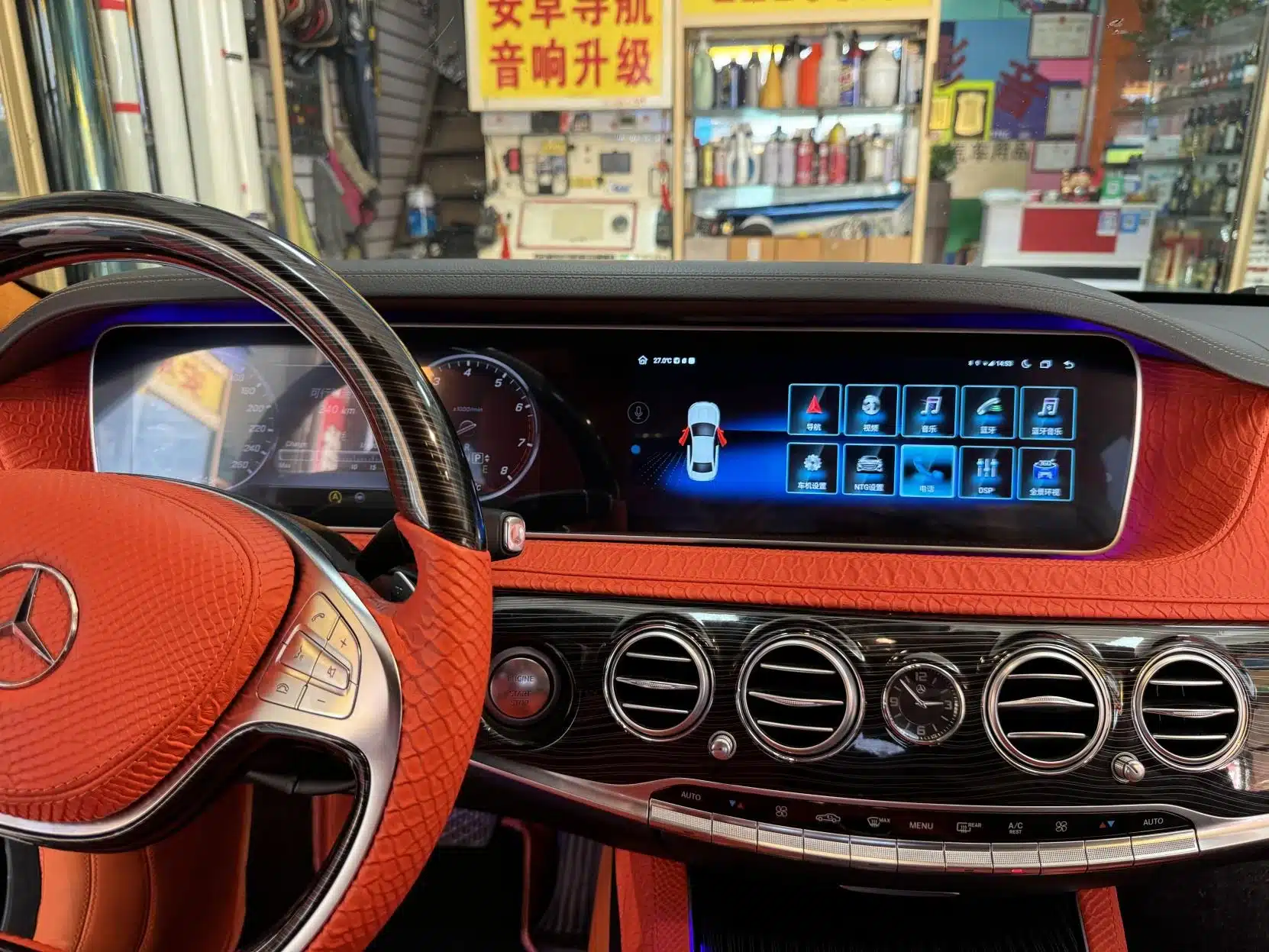
Kurze Antwort: Lohnt sich dieses W222 NTG5.0-Upgrade?
Ja, für Langzeit-W222-Besitzer, die moderne Telefonintegration wünschen. Der Mercedes S-Class W222 2014–2017 hat zwar eine luxuriöse Kabine, aber die ursprüngliche Infotainment-Erfahrung kann für Navigation, Anrufe, Musik und App-Nutzung veraltet wirken. Ein 12.3-Zoll-Android-Headunit mit kabellosem CarPlay und Android Auto verleiht der Kabine eine modernere Oberfläche für den täglichen Gebrauch, während die Dashboard-Ausrichtung nah am ursprünglichen Mercedes-Benz-Breitbild-Stil bleibt.
Die richtige Frage ist nicht nur: “Kann ich CarPlay hinzufügen?” Die bessere Frage ist: Kann das Upgrade korrekt angepasst, ohne Gewalt an den Steckverbindern installiert und getestet werden, bevor das Armaturenbrett wieder zusammengebaut wird? Genau hier kommt es auf die iKAGOO-Kompatibilitätsprüfung und den Installationssupport an.
iKAGOO Drei-Punkte-Bewertung für dieses W222-Produkt
Diese Bewertungen sind keine dekorativen Abzeichen. Sie basieren auf iKAGOOs eigenem Upgrade-Wert, der Kompatibilität mit dem Originalfahrzeug und den Installationsstandards. Jede Bewertung erklärt, warum dieses W222 NTG5.0 Android-CarPlay-Upgrade empfohlen wird, was noch bestätigt werden muss und warum die Installation nicht wie eine Anfänger-Plug-in-Arbeit behandelt werden sollte.
Notwendigkeit eines Upgrades
Diese Bewertung ist hoch, weil das Upgrade den Teil des W222 verändert, den Besitzer täglich nutzen: Navigation, Anrufe, Musik, Apps und Telefonkonnektivität. Das Auto mag sich weiterhin premium anfühlen, aber die Werksschnittstelle entspricht nicht mehr der Art, wie die meisten Fahrer heute Navigation und Medien nutzen.
- Kabelloses CarPlay und Android Auto verbessern die tägliche Navigation und Telefonnutzung.
- Das 12.3-Zoll-Android-Display bietet eine größere, klarere Benutzeroberfläche als ein kleines Zusatzmodul.
- Der breite Bildschirm folgt dem Stil des S-Klasse-Armaturenbretts, anstatt wie ein universelles Tablet auszusehen.
Kompatibilität mit Originalfahrzeugen
Ein 90/100 Kompatibilitäts-Score bedeutet nicht, dass 10% der Werksfunktionen absichtlich verloren gehen. Es bedeutet, dass die Route stark ist, aber es hängt immer noch von der korrekten W222-Versionsabstimmung, der Werkssystemidentifikation, dem Armaturenbrett-Layout, der Verbindungsroute und den Einrichtungstests ab.
- Original-Systemzugriff, Kamera-Route, Audio-Route und Fahrzeuginformationen sind wichtige Prüfungen.
- Lenkradbedienelemente und die Logik des Mittelkonsolen-Controllers bleiben wichtig.
- Türwarnung, Fahrzeuginformationen und die werksmäßige Interaktion müssen nach der Einrichtung getestet werden.
Schwierigkeitsgrad der Installation
Stufe 3 bedeutet, dass dies für erfahrene DIY-Installateure oder Kfz-Elektronik-Installateure geeignet ist. Es ist keine Aufgabe für Anfänger. Der Installateur sollte sich mit dem Entfernen von Verkleidungen, der Identifizierung von Steckverbindern, der Kabelbaumverlegung und dem vollständigen Funktionstest vor dem Wiederzusammenbau auskennen.
- In der Regel sind Verkleidungsarbeiten am Hauptbildschirm und am Armaturenbrett erforderlich.
- Mehrere Steckverbinder und die passende Fahrzeugschnittstelle müssen korrekt identifiziert werden.
- Vorübergehende Tests sollten Audio, Kamera, Lenkradbedienelemente, Originalmenüs und Schlaf-/Aufwachverhalten abdecken.
Warum die Standard-Links wichtig sind
Die W222-Bewertung ist keine eigenständige Marketingaussage. Die 92/100-Upgrade-Bewertung wird anhand des iKAGOO-Standards für Upgrade-Notwendigkeit beurteilt, die 90/100-Kompatibilitätsbewertung anhand des Rahmens für die Original-Fahrzeug-Kompatibilität von iKAGOO, und die Installationsbewertung der Stufe 3 anhand des iKAGOO-Standards für Installationsfreundlichkeit.
Dies gibt dem Käufer eine klare Möglichkeit zu verstehen, wie iKAGOO den Upgrade-Wert, die Integration ins Originalfahrzeug und die Fähigkeiten des Installateurs bewertet, bevor die W222-Android-CarPlay-Route empfohlen wird.
Warum diese Bewertungen glaubwürdig sind
Die Bewertungserklärung basiert auf der W222-Produktroute, ausgewählten Installationsnachweisen und der internen Installateur-Referenz von iKAGOO. Das Ziel ist nicht, das Upgrade einfacher erscheinen zu lassen, als es ist. Das Ziel ist, dem Käufer zu helfen, den Wert, die Kompatibilität und das Installationsrisiko vor der Bestellung zu verstehen.
Beweise hinter der 92/100-Upgrade-Notwendigkeit
Der Produktwert ist am größten für Besitzer, die ihren W222 langfristig behalten und moderne Navigation, Anrufe, Musik, Android-Apps, Wireless CarPlay und Android Auto wünschen. Dies ist eine Verbesserung für den täglichen Gebrauch, kein dekorativer Bildschirmtausch.
Belege hinter 90/100 Kompatibilität
Der Weg ist stark, weil er auf die Passform im W222-Armaturenbrett und unterstützte Werksfunktionspfade ausgelegt ist. Die Bewertung ist nicht 100, weil die exakte Funktionserhaltung weiterhin vom Fahrzeugjahr, Werkssystem, Audioweg, Kameraweg, Armaturenbrett-Layout und Steckverbinderinformationen abhängt.
Belege hinter Installation der Stufe 3
Diese Installationsbewertung wird durch reale Installationsevidenz gestützt. Die interne Referenz enthält mehr Schritte als der öffentliche Artikel zeigt, und die ausgewählten öffentlichen Bilder belegen weiterhin Verkleidungsdemontage, Bildschirmzugang, Umgang mit Steckverbindern, Kabelführung und Glasfaser-Vorsicht.
Käuferrisiko bei Ignorieren der Bewertung
Ein W222-Upgrade kann durch Bestellung der falschen Version, erzwungene Steckverbinder, übersprungene Funktionstests oder Unterschätzung des Glasfaser-Umgangs scheitern. iKAGOO nutzt Kompatibilitätsprüfung und Support-Grenzen, um diese Risiken zu reduzieren, bevor das Gerät versandt wird und bevor das Armaturenbrett geschlossen wird.
Wie iKAGOO Bestellungen der falschen Version und das Risiko von Installationsfehlern reduziert
iKAGOO reduziert das Installationsrisiko nicht durch unrealistische Versprechen. Das Risiko wird durch Kontrolle der Details reduziert, die üblicherweise zu Fehlern führen: falscher Modellweg, falscher Kabelbaum, unklares Werkssystem, erzwungener Umgang mit Steckverbindern, Glasfaserfehler und unvollständige Tests vor dem Zusammenbau.
1. Kompatibilitätsprüfung vor dem Versand
Vor der Vorbereitung der Bestellung prüft iKAGOO das Modelljahr, das Armaturenbrettfoto, das Werkssystem, das LHD-/RHD-Layout, den Kameraweg, das Audiopaket und bei Bedarf die Steckverbinderinformationen. Dies hilft zu vermeiden, ein Produkt nur deshalb zu wählen, weil ein Foto ähnlich aussieht.
2. Korrekte Vorbereitung von Bildschirm, Kabelbaum und Weg
Der Bildschirm, der Kabelbaum, die CANBUS- oder Fahrzeugschnittstelle und das Zubehör werden gemäß den Fahrzeuginformationen vorbereitet. Dies ist wichtig, weil internationale Rücksendungen langsamer und teurer sind als sorgfältige Prüfung vor dem Versand.
3. Stoppen, bevor Steckverbinder erzwungen werden
Wenn der Steckverbinder, der LVDS-Weg, der Stromkabelbaum oder das Verhalten des Werkssystems nicht übereinstimmen, sollte der Installateur stoppen und iKAGOO kontaktieren. Werksverkabelung nicht durchtrennen, Stecker nicht erzwingen und Steckverbinderplatzierung nicht raten.
4. Funktionstests vor dem Zusammenbau
Bevor das Armaturenbrett vollständig zusammengebaut wird, Stromversorgung, Bildschirmausgabe, Audio, CarPlay, Android Auto, Werkskameraweg, Lenkradbedienelemente, Originalmenüs und ggf. Schlaf-/Aufwachverhalten testen.
Warum die vollständige 45-Schritt-Installer-Referenz hier nicht veröffentlicht wird
Diese öffentliche Anleitung zeigt ausgewählte Schlüsselschritte, damit Käufer den realen Installationsweg verstehen können. iKAGOO behält die vollständige interne Installationsreferenz für Support und Fehlerbehebung. Das schützt den technischen Prozess und gibt Kunden dennoch genügend visuelle Belege, um zu beurteilen, ob dies der richtige Upgrade-Weg ist.
Evidenzgrundlage und technische Prüfung
Diese Anleitung basiert auf dem Produktweg des Android-Head-Units für Mercedes-Benz S-Klasse W222 2014–2017, ausgewählten öffentlichen Installationsbildern und der internen W222-Installer-Referenz von iKAGOO. Die vollständige interne Referenz enthält 45 Installationsschritte und 43 extrahierte Installationsbilder, während dieser öffentliche Artikel nur ausgewählte Schlüsselschritte zeigt, um Kompatibilität, Installationsniveau und Käuferrisiko zu erklären.
- Überprüft von: iKAGOO-Technikteam
- Zuletzt überprüft: Juli 2026
- Verwendete öffentliche Belege: 12 ausgewählte W222-Installationsbilder
- Interne Support-Referenz: Vollständige 45-Schritt W222-Installationsanleitung, aufbewahrt von iKAGOO
- Inhaltliche Grenze: Dieser Artikel veröffentlicht nicht das vollständige interne Installationshandbuch, die vollständige Glasfaserroute, die vollständige Stromkabelbaumroute oder das private Kunden-PDF.
Visuelle Installationsevidenz: Was das W222-Upgrade tatsächlich beinhaltet
Die unten ausgewählten Bilder sollen nicht das vollständige interne Installationshandbuch offenlegen. Sie zeigen die echten Käuferbedenken: Zierleistenentfernung, Bildschirmzugang, Steckerhandhabung, Glasfaservorsicht und das endgültige Installationsergebnis.
Die Entfernung der rechten Zierleiste beginnt den kontrollierten Zugangsprozess
Der Installateur benötigt sorgfältigen Zugang hinter dem W222-Armaturenbrett, bevor die Android-CarPlay-Einheit angeschlossen werden kann. Deshalb sollte die Arbeit nicht als einfache Softwareaktivierung beurteilt werden.
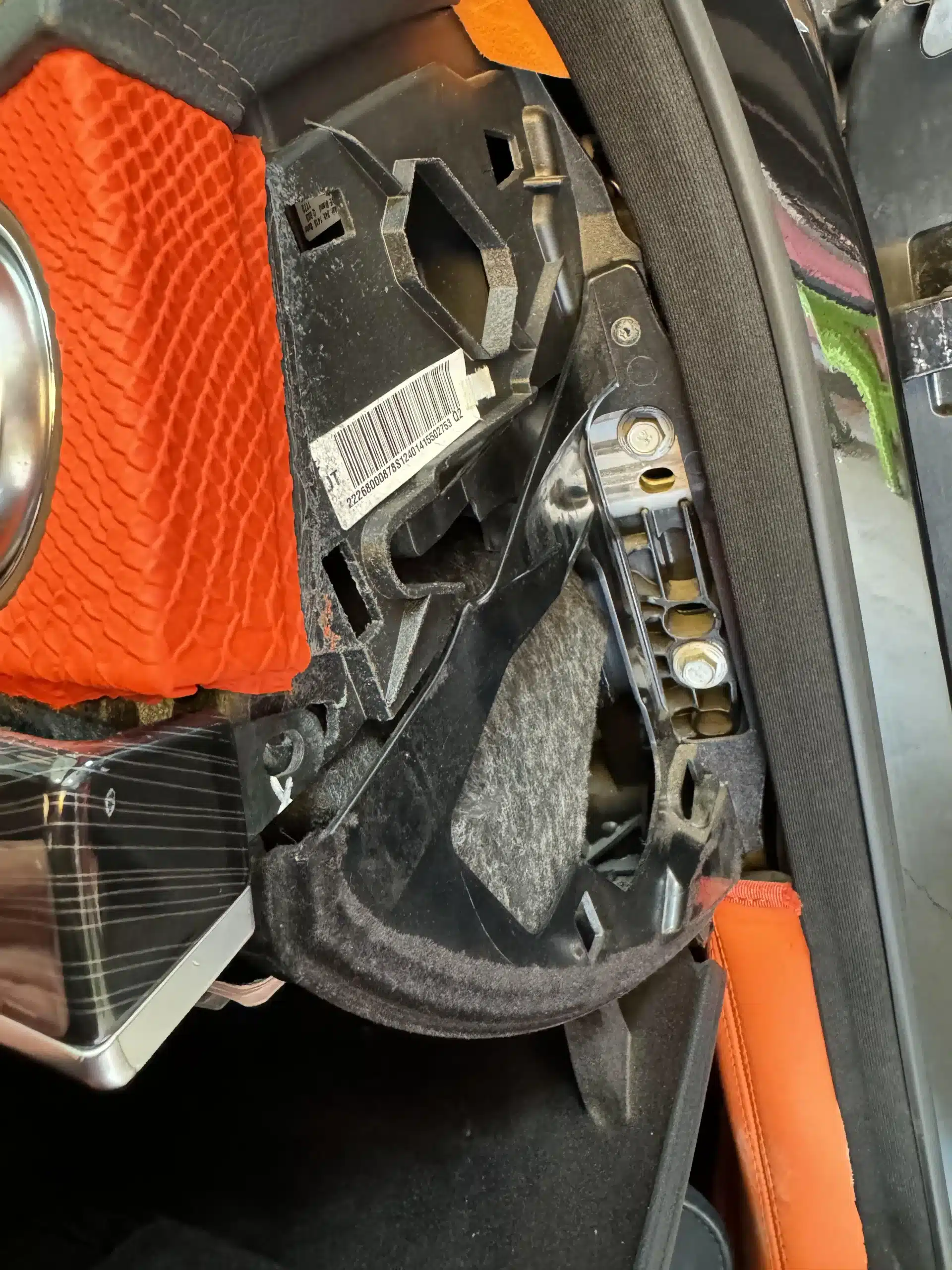
Die Arbeit an der Lüftungszierleiste zeigt, warum der Umgang mit Clips wichtig ist
Der W222-Innenraum hat eine hochwertige Innenausstattung. Eine gute Installation bedeutet, Zierleisten zu entfernen, ohne Clips, Kanten oder den ursprünglichen Armaturenbrettcharakter zu beschädigen.
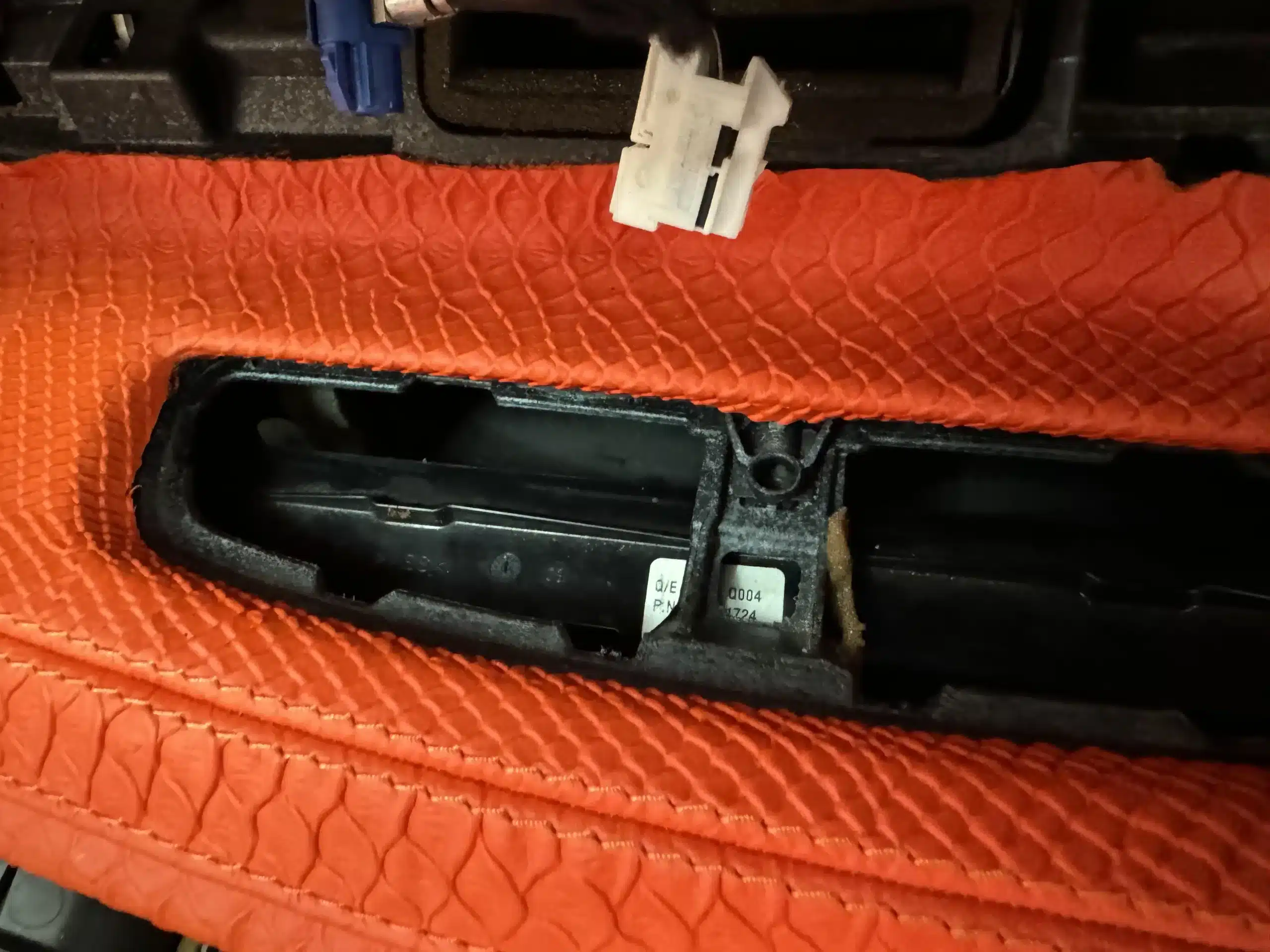
Das Klimabedienfeld muss vor dem Bildschirmzugang behandelt werden
Dieser Schritt ist wichtig, weil das W222-Upgrade in die ursprüngliche Innenraumstruktur integriert ist. Der Installateur braucht Geduld und die richtigen Werkzeuge, keine Gewalt.
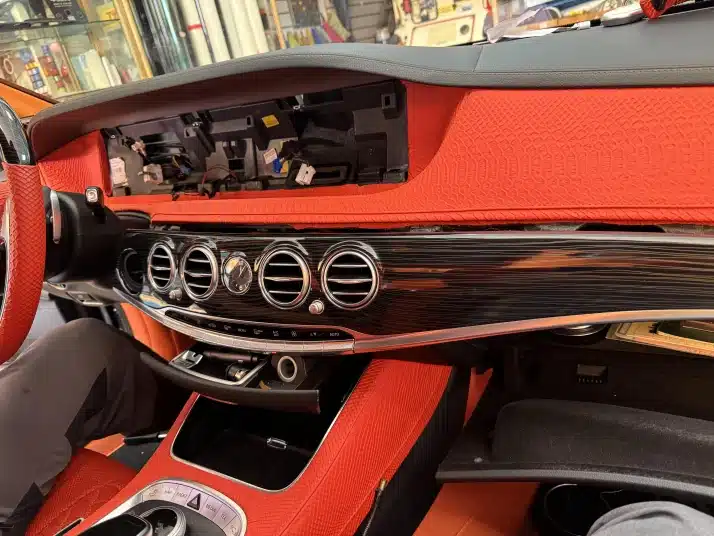
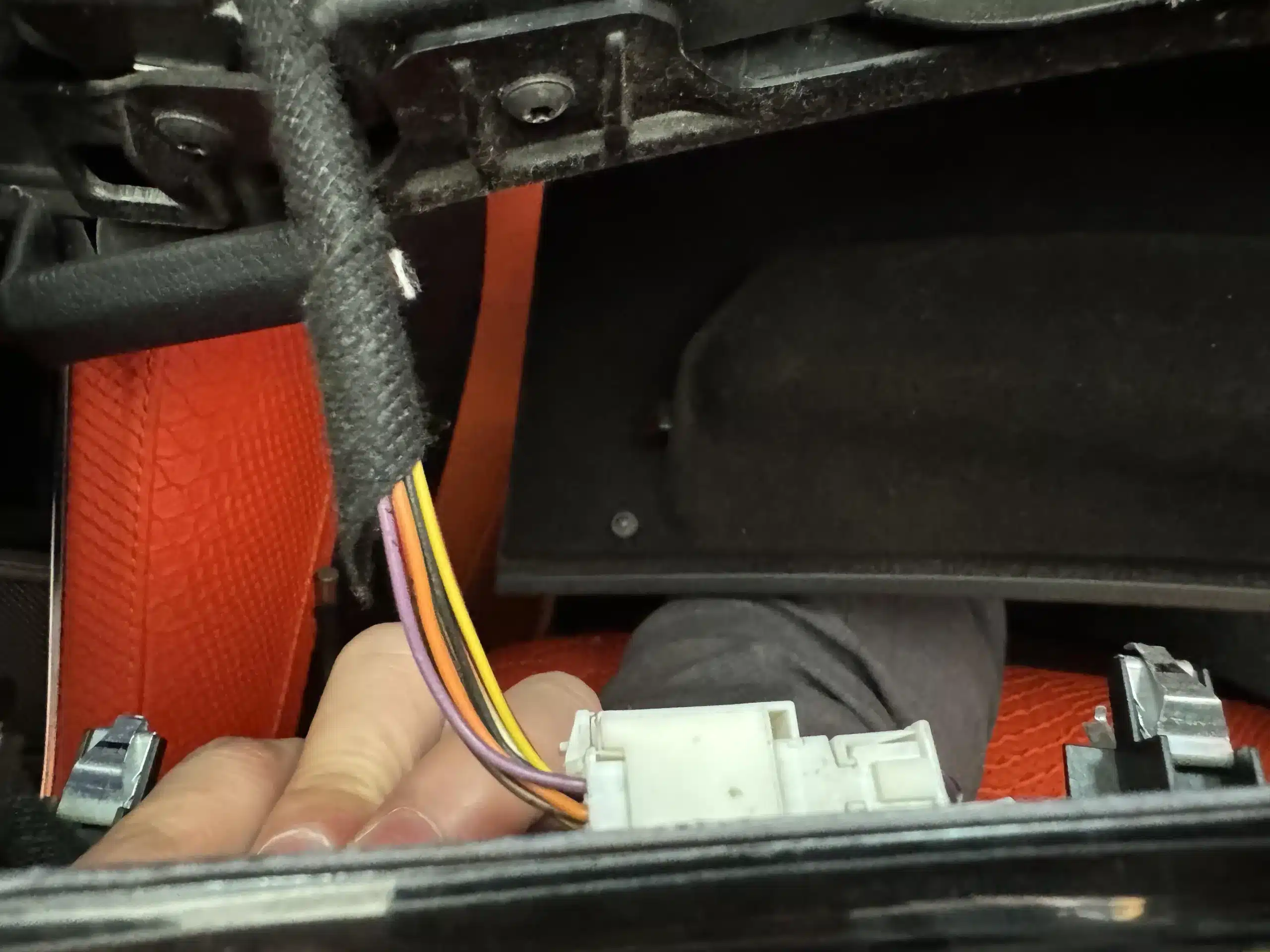
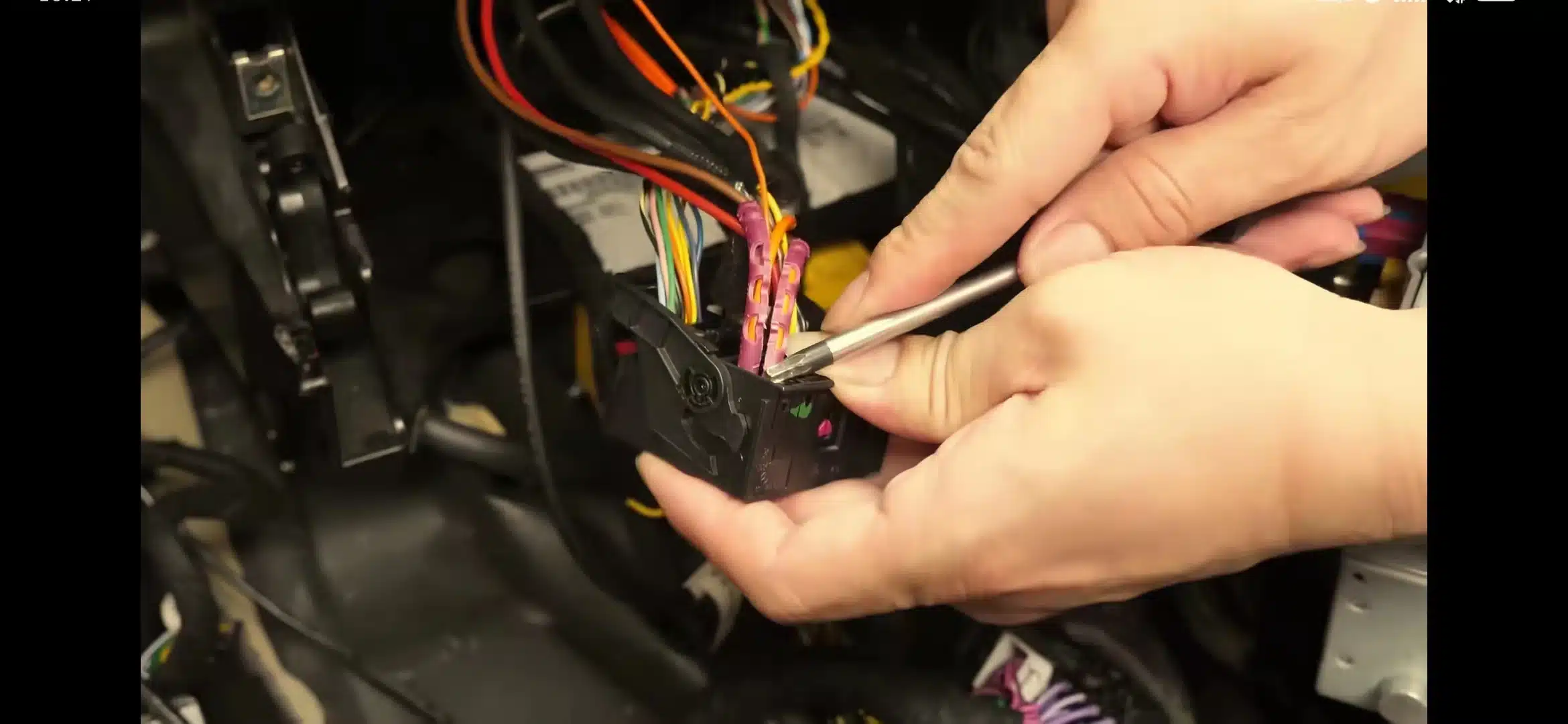
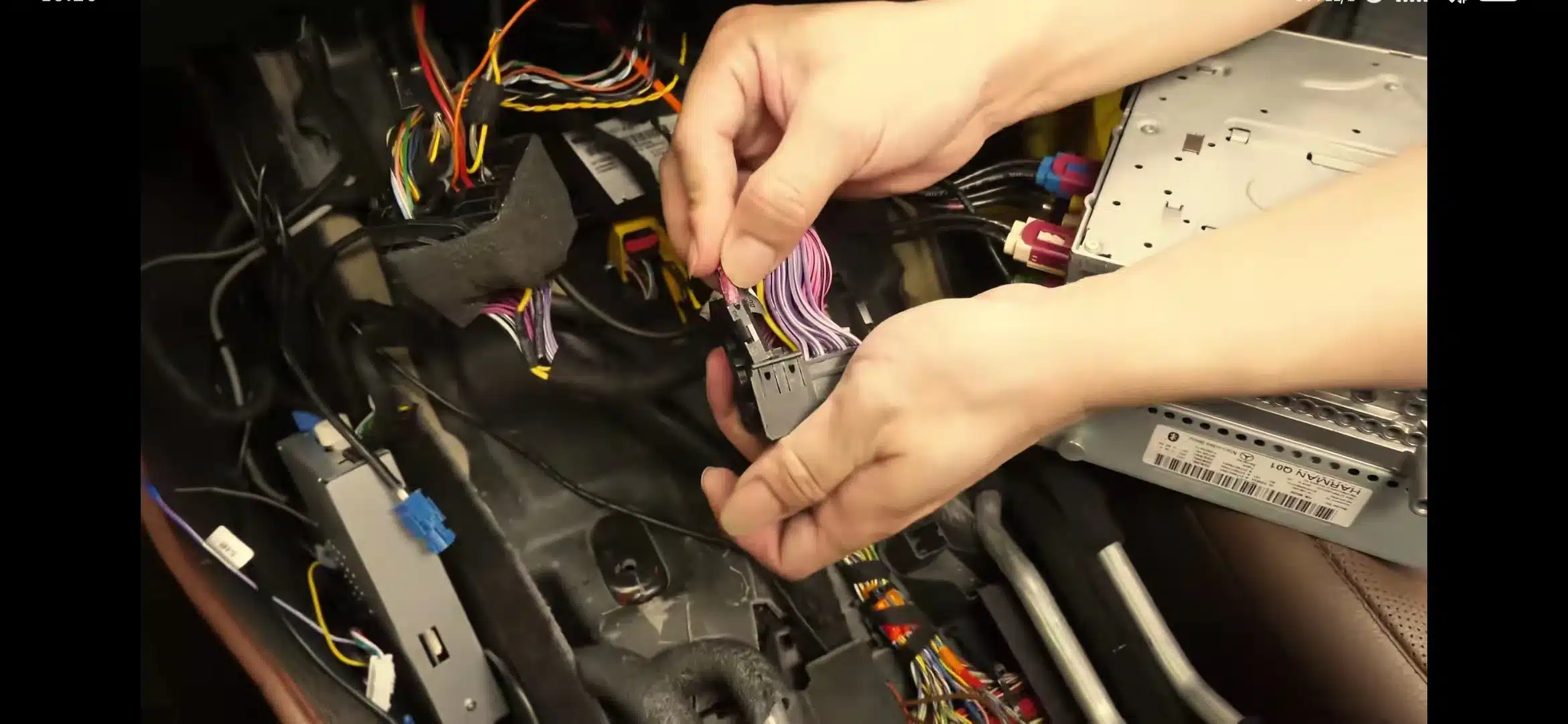
Das Trennen von Steckern ist ein Risikopunkt, kein Geschwindigkeitsschritt
Der richtige Ansatz ist, den Stecker zu identifizieren, ihn sauber zu lösen und zu vermeiden, am Kabelbaum zu ziehen. Wenn die Steckerroute nicht zum mitgelieferten Kabelbaum passt, stoppen Sie, bevor Sie fortfahren.
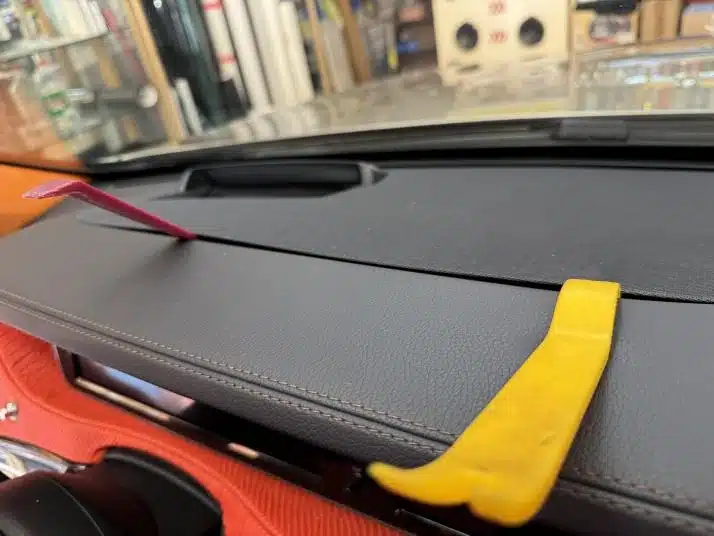
Der Zugang zum oberen Armaturenbrett bestätigt, dass die Arbeit über eine einfache Box-Installation hinausgeht
Der Installateur muss möglicherweise um den Bereich des Armaturenbrett-Lautsprechergitters herumarbeiten. Dies ist ein weiterer Grund, warum die Bewertung Level 3 Advanced DIY ehrlicher ist als die Bezeichnung der Arbeit als anfängerfreundlich.
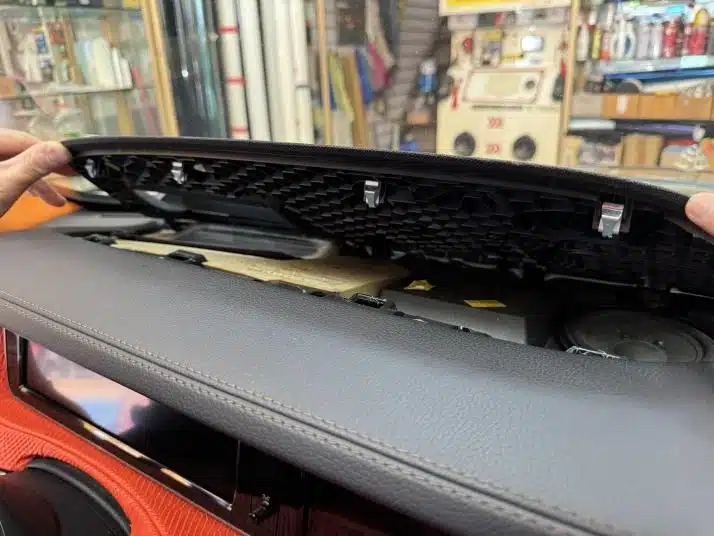
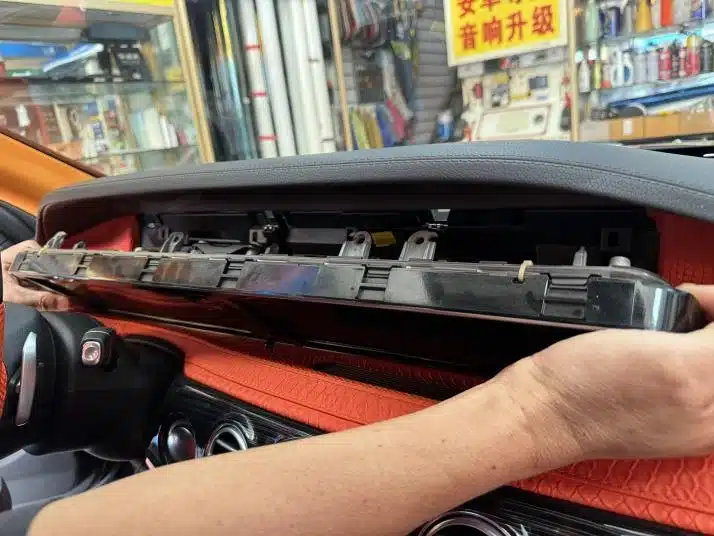
Der Werksbildschirmbereich ist Teil des tatsächlichen Installationspfads
Deshalb sollte ein vollständiges Android-Bildschirm-Upgrade auf die W222-Armaturenbrettarchitektur abgestimmt sein. Es ist eine stärkere Innenraumauffrischung als ein kleines CarPlay-only-Add-on, erfordert aber auch mehr Sorgfalt.
Verkabelungs- und Glasfaservorsicht beeinflussen das Kompatibilitätsvertrauen
Ein W222-Upgrade hängt von der korrekten Routenvorbereitung ab. Kabelbaumlayout, Werksaudio, Kameraroute und Glasfaserkonfiguration sollten vor dem Versand überprüft und während der Installation erneut kontrolliert werden.
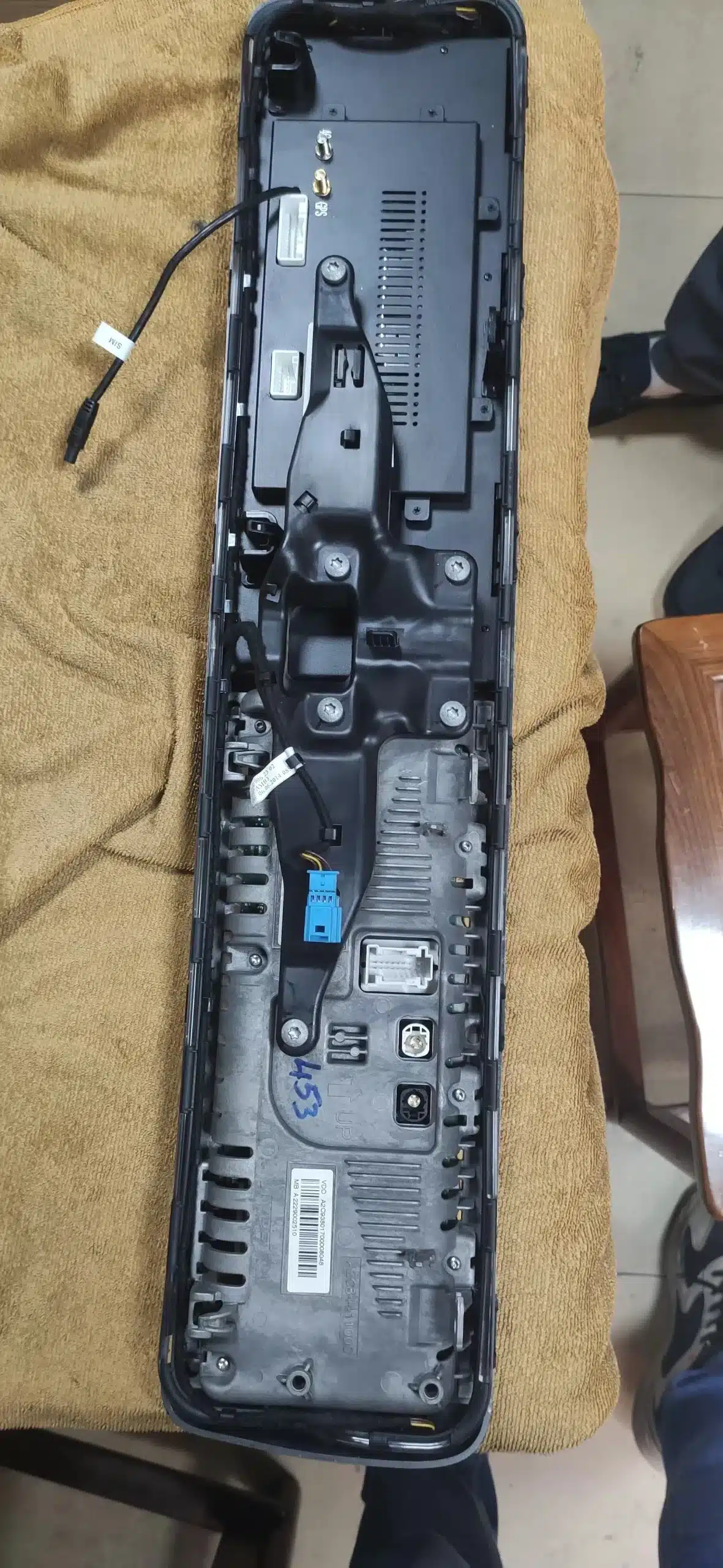
Key-Line-, LVDS- und Kabelbaumprüfungen erfolgen vor der Endmontage
Der Installateur sollte die Armaturenbrettmontage nicht abschließen, bis Bildschirmausgabe, Audio, Kamerafunktion, Lenkradsteuerung und Zugriff auf das Originalmenü getestet wurden.
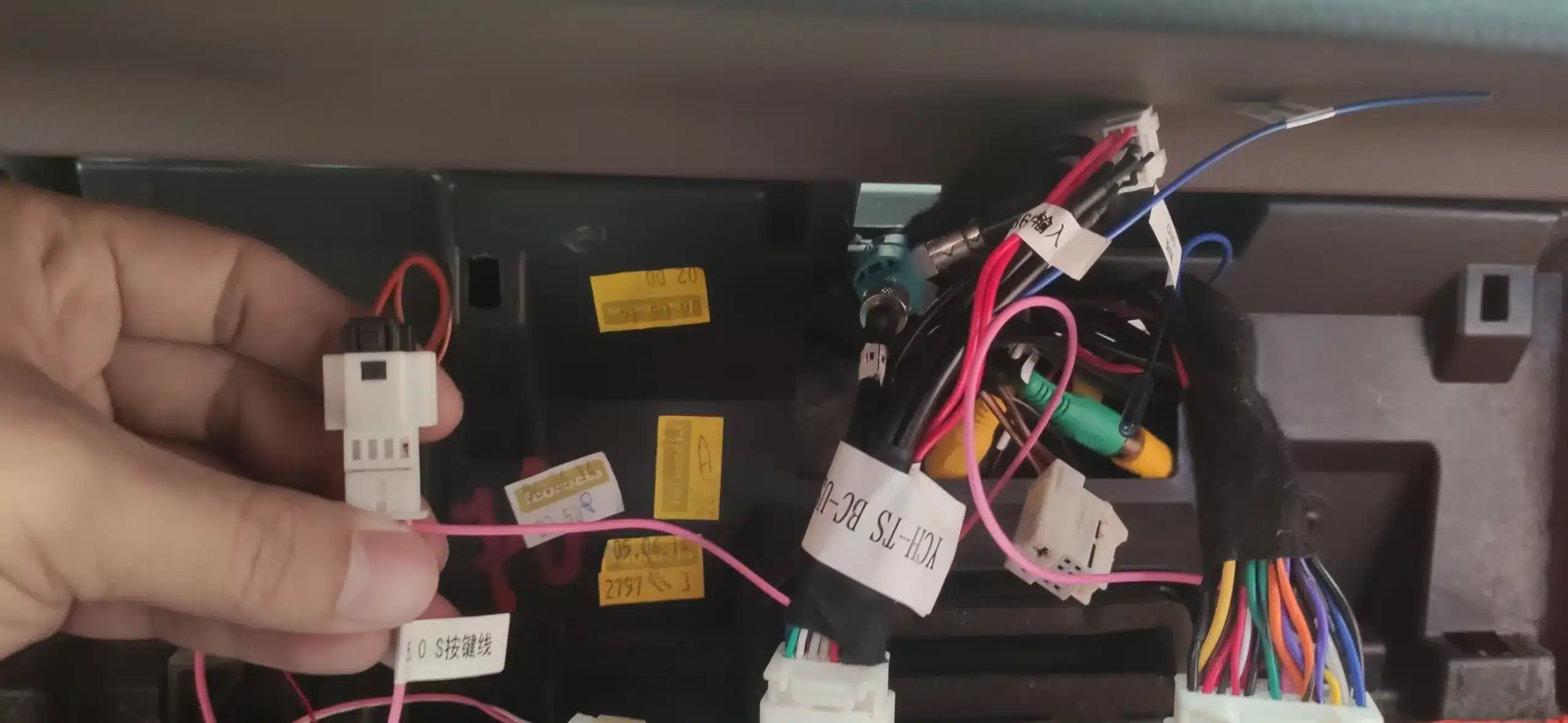
Die Handhabung von Glasfasern wird als Hochrisikopunkt behandelt
Das Glasfaserkabel nicht biegen, ziehen, quetschen oder mit Gewalt behandeln. Wenn die Glasfaserverlegung, das Audiosystem oder das Anschlusslayout nicht zum vorbereiteten Kabelbaum passt, stoppen Sie und kontaktieren Sie iKAGOO, bevor Sie fortfahren.
Das Ergebnis sollte wie ein S-Klasse-Cockpit-Upgrade aussehen, nicht wie ein universelles Tablet
Das Ziel ist ein modernes Android-, CarPlay- und Android-Auto-Erlebnis, das den W222-Innenraum respektiert. Deshalb sind Passgenauigkeitsprüfung und Installationstests wichtig, bevor Sie einen Produktweg wählen.
Warum dies mehr als ein reines CarPlay-Modul ist
Vollständiger Android-Bildschirmweg
Besser für Besitzer, die eine 12.3-Zoll-Armaturenbrett-Aktualisierung, Android-Apps, CarPlay, Android Auto, GPS und ein vollständigeres Cockpit-Update wünschen.
Modul nur für CarPlay
Nützlich, wenn Ihr einziges Ziel die Handy-Spiegelung ist, aber es aktualisiert das gesamte Bildschirmerlebnis nicht auf die gleiche Weise wie ein komplettes Android-Display-Upgrade.
Generischer Universalbildschirm
Hat normalerweise eine geringere Passgenauigkeits-Sicherheit. In einer S-Klasse-Kabine können schwache physische Passgenauigkeit oder schwacher Support mehr kosten als die anfängliche Ersparnis.
Was iKAGOO benötigt, bevor Ihre W222-Bestellung vorbereitet wird
Senden Sie klare Informationen vor dem Versand. Dies hilft iKAGOO, die richtige Version vorzubereiten, und hilft Ihrem Installateur, vermeidbare Anschlussfragen zu vermeiden.
Fahrzeugdaten
- Modelljahr: 2014, 2015, 2016 oder 2017
- Mercedes-Benz S-Klasse W222 Ausstattung
- Linkslenker oder Rechtslenker
- Länder- oder Marktversion
Fotos und Details zum Werkssystem
- Foto des gesamten Armaturenbretts
- Originaler Bildschirmbereich
- Bedienbereich und Mittelkonsolen-Controller-Weg
- Werkskamera oder 360 Kamera
- Premium-Audio- oder Glasfaser-Soundsystem
- Frühere Aftermarket-Verkabelung, falls vorhanden
Wählen Sie den richtigen W222-Produktweg
Beide W222-Produkteinträge können für die Käufernavigation verwendet werden. Der sicherste Kaufweg ist jedoch, Ihre Fahrzeugdaten vor dem Versand zu senden, damit iKAGOO den richtigen Bildschirm, Kabelbaum und Schnittstellenweg bestätigen kann.
FAQ: Echte Käuferbedenken vor einem W222 NTG5.0 Android CarPlay Upgrade
Kann ich CarPlay zu einer Mercedes S-Klasse W222 2014–2017 hinzufügen?
Ja. Der W222 2014–2017-Weg kann ein 12.3-Zoll-Android-Head-Unit mit Wireless CarPlay und Android Auto unterstützen, aber iKAGOO sollte das Fahrzeugjahr, das Armaturenbrett-Layout, das Werkssystem und den Anschlussweg vor dem Versand bestätigen.
Ist das dasselbe wie eine kleine CarPlay-Box?
Nr. Ein reines CarPlay-Modul fügt hauptsächlich die Handy-Projektion hinzu. Dieser Weg ist ein umfassenderes Android-Bildschirm-Upgrade mit CarPlay, Android Auto, Apps, GPS und einer vollständigeren Armaturenbrett-Aktualisierung.
Funktionieren die originalen Lenkradbedienelemente weiterhin?
Ja, nach korrekter Verbindung und Einrichtung. Multimedia-Lenkradbedienelemente sind Teil des unterstützten Werkssteuerungs-Wegs, aber der Installateur sollte sie vor der endgültigen Verkleidungsmontage testen.
Wird die Werkskamera oder 360-Kamera weiterhin funktionieren?
Ja, wo der passende Fahrzeugweg zutrifft. Werks-Rückfahrkamera und unterstützte 360-Kamerawege sind so ausgelegt, dass sie nach korrekter Zuordnung und Konfiguration verfügbar bleiben. Senden Sie Kameradetails vor dem Versand, wenn Ihr Fahrzeug ein spezielles Paket hat.
Unterstützt dieses Upgrade auch Android Auto sowie Apple CarPlay?
Ja. Wireless CarPlay und Android Auto werden für Karten, Anrufe, Musik und handybasierte Apps auf dem aufgerüsteten Display unterstützt.
Muss ich die werkseitige Verkabelung durchtrennen?
Nr. Es ist kein absichtliches Durchtrennen unterstützter Werksverkabelung geplant. Der korrekte Weg verwendet passende Verkabelungs- und Schnittstellenverbindungen, gefolgt von Tests vor der Montage.
Ist dies für eine Anfänger-DIY-Installation geeignet?
Nr. Das Produkt ist als Level 3 Advanced DIY eingestuft, was erfahrene DIY-Installateure oder Installateure für Kfz-Elektronik bedeutet. Erstmalige Installateure sollten einen professionellen Installateur beauftragen.
Was ist der empfindlichste Installationspunkt?
Die Glasfaserroute, die LVDS-Route und die passenden Kabelsatzverbindungen. Das Glasfaserkabel nicht biegen, ziehen, quetschen oder mit Gewalt behandeln. Wenn die Route nicht passt, stoppen Sie und kontaktieren Sie iKAGOO, bevor Sie fortfahren.
Warum ist die Original-Fahrzeugkompatibilität 90/100 statt 100/100?
Weil sich W222-Fahrzeuge nach Jahr, Markt, Audiosystem, Kameraroute, Armaturenbrett-Layout und früheren Modifikationen unterscheiden können. Eine 90/100 Near-OEM-Route bedeutet starke fahrzeugspezifische Integration, kein universelles Versprechen ohne Prüfung.
Wie reduziert iKAGOO das Risiko von Installationsfehlern?
Durch Prüfung vor dem Versand und Unterstützung des Installateurs mit Nachweisen. iKAGOO prüft die Fahrzeugroute, bereitet den richtigen Bildschirm- und Kabelsatzpfad vor, fordert bei Bedarf Fotos oder Videos zur Fehlerbehebung an und empfiehlt, Audio, Kamera, Bedienelemente und Originalmenüs vor dem Zusammenbau zu testen.
Warum bei iKAGOO kaufen statt bei einem günstigeren No-Name-Gerät?
Weil es bei einem W222-Upgrade nicht nur um die Bildschirmgröße geht. iKAGOO prüft die Fahrzeugroute, bereitet den Bildschirm und den Kabelsatz für Ihre Bestellung vor, unterstützt bei Installationsfragen und bietet nach der Zahlung einen klareren Support-Pfad.
Was muss ich vor der Bestellung einsenden?
Senden Sie Ihr Modelljahr, ein Foto des Armaturenbretts, ein Foto des Originalbildschirms, ein Foto des Bedienbereichs, die LHD/RHD-Position, Details zur Werkskamera, Details zum Audio-Paket und alle Informationen zu früherer Aftermarket-Verkabelung. Dies hilft iKAGOO, die richtige Route vor dem Verpacken zu bestätigen.
Abschließende Kaufempfehlung
Wählen Sie das Mercedes S-Class W222 NTG5.0 Android CarPlay Upgrade, wenn Sie eine echte Auffrischung des Armaturenbrett-Bildschirms mit CarPlay, Android Auto, Apps, moderner Navigation und Integration im Werksstil wünschen. Wählen Sie es nicht blind allein anhand von Fotos. Senden Sie zuerst Ihre Fahrzeuginformationen, bestätigen Sie die Route und stellen Sie sicher, dass Ihr Installateur mit Level 3 Advanced DIY-Arbeiten vertraut ist.
Fahrzeugspezifische Kompatibilität, Installationssupport und Garantieabdeckung folgen der geltenden iKAGOO-Richtlinie und Fallprüfung.








Add comment
Du musst angemeldet sein, um einen Kommentar abzugeben.