


Kabelloses CarPlay und Android Auto auf Ihrem VW-Armaturenbrett
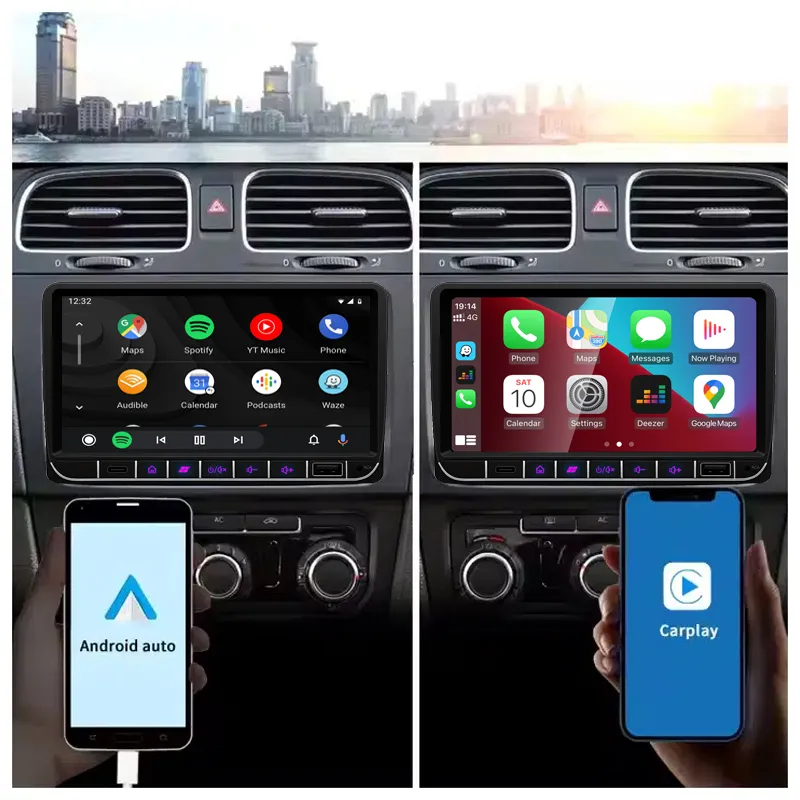
Nutzen Sie vertraute Karten, Musik und Anrufe von Ihrem Telefon über den zentralen Bildschirm, während das Armaturenbrett nahe am ursprünglichen VW-Layout bleibt.

| Gewicht | 2.5 kg |
|---|---|
| Maße | 35 × 27 × 17 cm |
| Farbe: | Schwarz |
| DriveMaster: | 12GB/256GB Kern A76 - CP/AA/360/DSP/5G/WiFi, 2GB/32GB-4Kern A53 FM/Wifi, 4GB/64GB - 8 Kern A55 - CP/AA/DSP/4G/WiFi, 8GB/128GB -8 Kern A75 - CP/AA/DSP/4G/WiFi |
| Name | Volkswagen Android-Stereoanlage (Universal) |
| Speicher | 12GB/512GB - Core A76 - 360/DSP/5G, 2GB/32GB - 4Core FM/WiFi, 4GB/64GB - 8Core CP/AA/DSP/4G, 8+128GB 8Core CP/AA/DSP/4G |
| Kern | 4 Kern, 8 Kern |
| Bildschirm-Pix | 1024*600Pixel |
| Bildschirmgröße | 7.0" |
| Material der Rückseite | Kunststoff/Metall |




From: $295.00

Bei berechtigten Bestellungen aus der EU und den USA übernehmen wir die anfallende Mehrwertsteuer und die Einfuhrzölle. Geschätzte Ersparnis: $120-$280 .
Die Versandkosten werden separat berechnet. Die genauen Versandkosten werden je nach Bestimmungsort berechnet und vor dem Bezahlvorgang in Ihrem Warenkorb angezeigt.
Der endgültige Versand wird anhand Ihrer Lieferadresse an der Kasse bestätigt.
Kompatibilitätsprüfung, umfassender Kompatibilitätsschutz, eine 12-monatige Hardware-Garantie und fortlaufender Support nach der Installation.
 Vollständige Rückerstattungsgarantie
Kompatibilitätsgarantie
Wurde die Inkompatibilität mit Ihrem Fahrzeug bestätigt? Dann erhalten Sie den Kaufpreis vollständig zurückerstattet.
→
Vollständige Rückerstattungsgarantie
Kompatibilitätsgarantie
Wurde die Inkompatibilität mit Ihrem Fahrzeug bestätigt? Dann erhalten Sie den Kaufpreis vollständig zurückerstattet.
→
 12-Month Hardware-Garantie
Für die ersten 12 Monate besteht eine Hardware-Garantie.
→
Langfristiger Kundendienst
Software-Beratung, Ersatzteilunterstützung und Reparaturkoordination bleiben mit Ihrer ursprünglichen Bestellung verknüpft.
→
12-Month Hardware-Garantie
Für die ersten 12 Monate besteht eine Hardware-Garantie.
→
Langfristiger Kundendienst
Software-Beratung, Ersatzteilunterstützung und Reparaturkoordination bleiben mit Ihrer ursprünglichen Bestellung verknüpft.
→
Unser Ziel ist es, Ihre Bestellung richtig zu bearbeiten, bevor sie uns verlässt. Wir prüfen die Kompatibilität, bereiten die korrekte Konfiguration vor und kontaktieren Sie nur, wenn etwas bestätigt werden muss.
VW / SEAT / Skoda Android-Radio-Nachrüstung
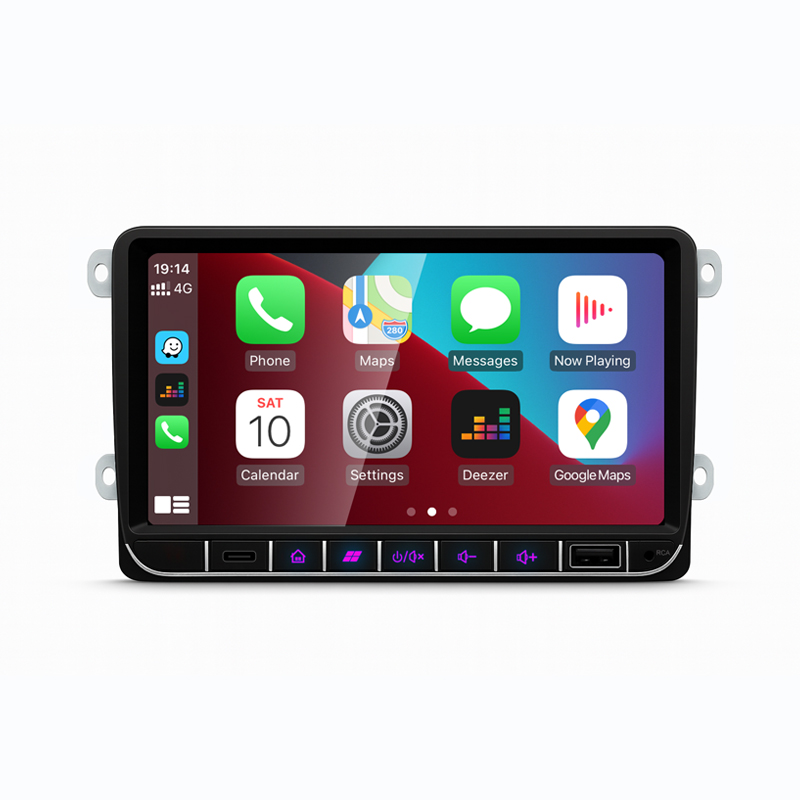
Rüsten Sie Ihr originales VW-Armaturenbrett mit einem fahrzeugspezifischen Android-Radio auf, das für kabelloses CarPlay, Android Auto, GPS-Navigation, Bluetooth, DSP-Optionen und die Integration der Werksfunktionen über den passenden Kabelbaum und die richtige CANBUS-Konfiguration vorbereitet ist.
Zuerst die vorgestellten Medien
Diese Bilder helfen Ihnen, das Armaturenbrett-Erscheinungsbild, die Smartphone-Integration, das Layout der hinteren Anschlüsse, die enthaltene Verkabelung und den Stil des Originalradios zu verstehen, den Sie vor der Auswahl Ihrer Version prüfen sollten.
Nutzen Sie vertraute Karten, Musik und Anrufe von Ihrem Telefon über den zentralen Bildschirm, während das Armaturenbrett nahe am ursprünglichen VW-Layout bleibt.
Lenkradbedienung, Kamerabild, Fahrzeuginformationen und Premium-Audio-Unterstützung hängen davon ab, dass der richtige Kabelbaum und das richtige CANBUS-Setup für Ihr Fahrzeug verwendet werden.
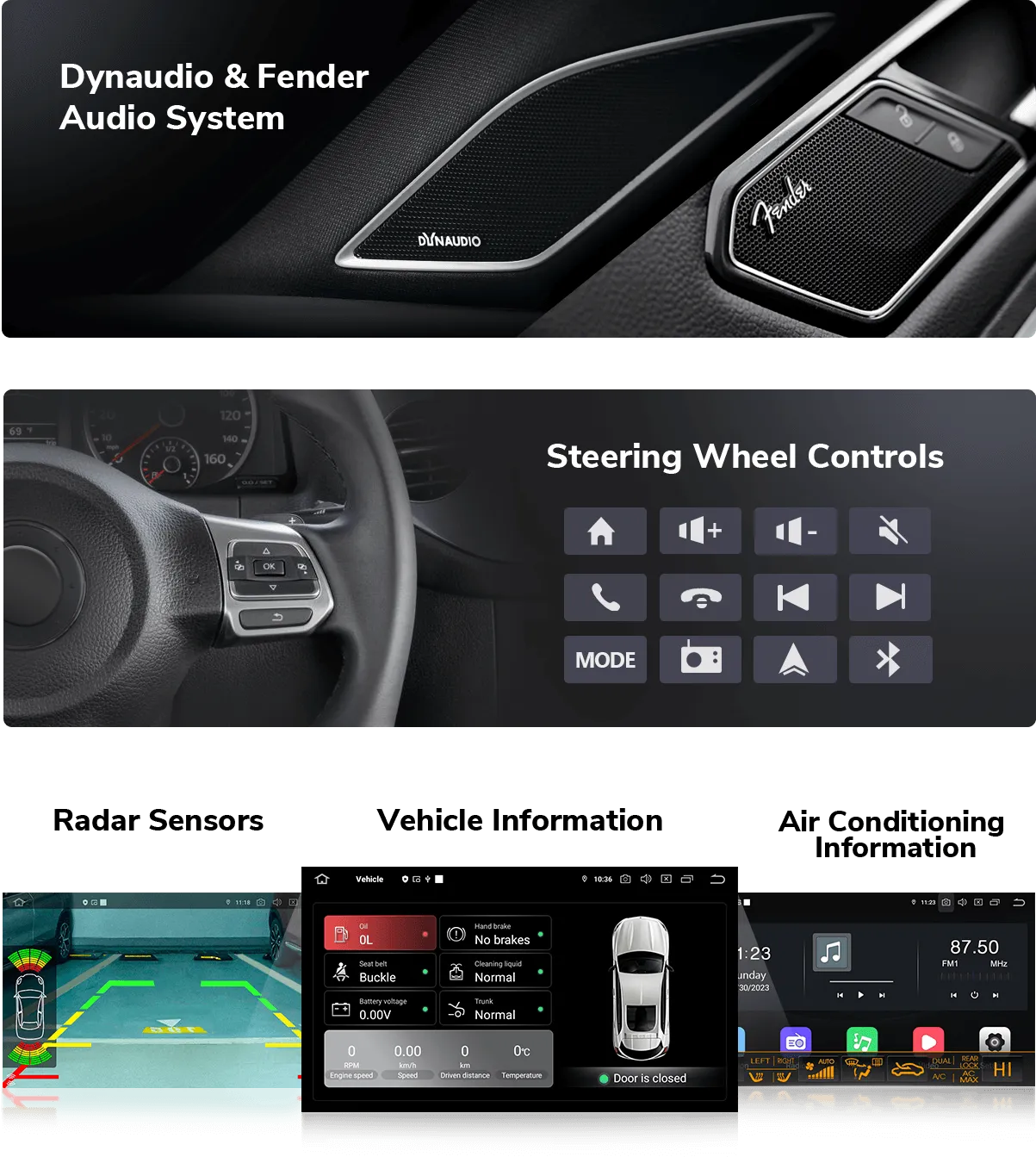
Das richtige Kabelpaket reduziert das Risiko von Fehlmontagen und hilft dem Android-Radio, nach der Installation mit dem Fahrzeugsystem zu kommunizieren.
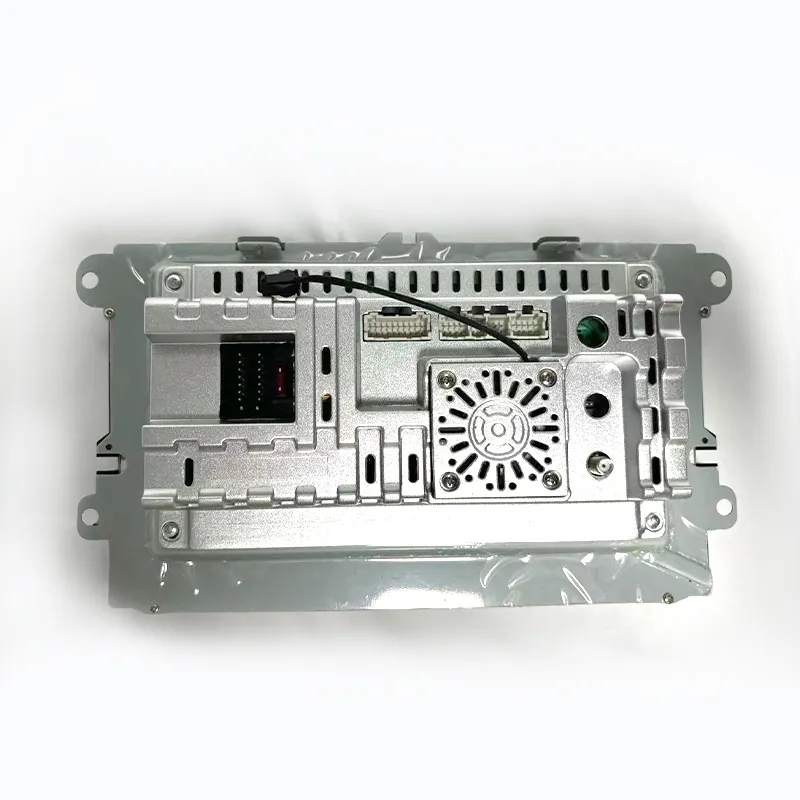
Die Rückseite des Geräts zeigt den Anschlussbereich und das Gehäusedesign und hilft Installateuren, Strom-, Antennen-, USB-, Kamera- und Audioanschlüsse vor dem Wiedereinbau des Armaturenbretts zu planen.
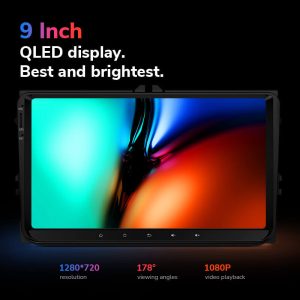
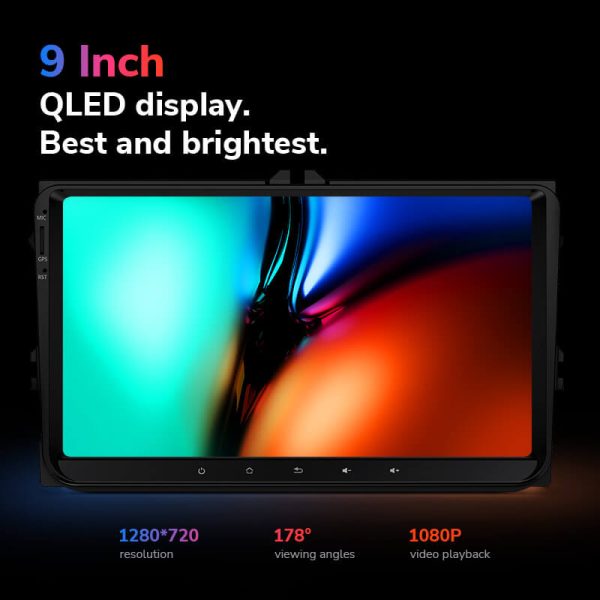
Ein klares Display verbessert die alltägliche Navigation, die Musiksteuerung und die Sichtbarkeit der Rückfahrkamera im Vergleich zu einem älteren Werksradio-Display.
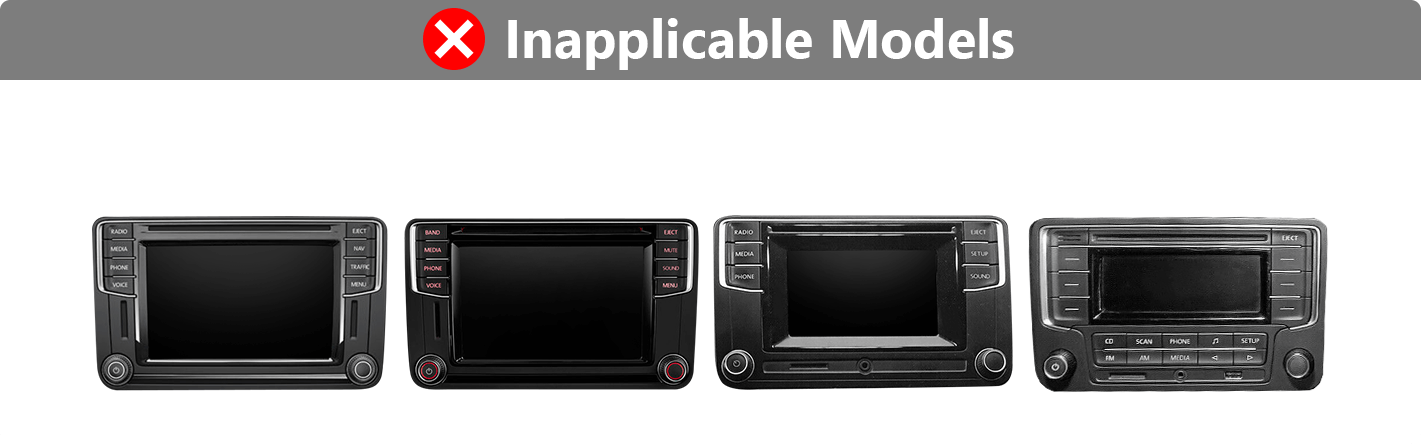
Wenn Ihre Werksradioform zur nicht anwendbaren Gruppe gehört, benötigen Sie möglicherweise ein anderes Installationsset oder eine andere Produktversion.
Schnelle Antwort
Dieses Android-Headunit für Volkswagen ist ein Ersatz-Android-Radio für viele VW-, SEAT- und Skoda-Armaturenbretter, einschließlich der beliebten Modelle Golf, Passat, Jetta, Polo, Tiguan und verwandter Modelle. Es verbessert das ursprüngliche Radioerlebnis mit drahtlosem CarPlay, Android Auto, GPS-Navigation, Bluetooth, App-Zugriff und optionalen DSP-, 4G/5G- und 360-Funktionen, je nach gewählter DriveMaster-Version. Die werksseitigen Lenkradbedienelemente, Kamerafunktionen, Premium-Audio und Fahrzeuginformationen können weiterhin funktionieren, wenn der richtige Kabelbaum und die CANBUS-Schnittstelle vorbereitet sind. Geben Sie vor der Bestellung Ihr Fahrzeugmodell, das Baujahr, ein Armaturenbrettfoto und die ursprüngliche Audio-/Kamerakonfiguration an, damit iKAGOO die richtige Version zuordnen kann. Wählen Sie iKAGOO, wenn Sie möchten, dass Bildschirm, Kabelbaum und Schnittstelle speziell für Ihr Fahrzeug vorbereitet werden, anstatt blind ein generisches Android-Radio zu kaufen.
Wichtigste Kaufgründe
Drahtloses CarPlay und Android Auto bringen Telefonkarten, Anrufe, Nachrichten und Musik auf den Zentralbildschirm, ohne von der alten Werksradio-Schnittstelle abhängig zu sein.
Nutzen Sie Google Maps, Offline-Navigations-Apps und Android-Apps auf einem größeren Touchscreen für ein nützlicheres tägliches Fahrerlebnis.
Die Versionen Lite, Pro, Ultra und Max ermöglichen Ihnen die Wahl zwischen Einsteiger-Nutzung, stärkerer CPU/RAM, DSP-Audio, 4G/5G-Netzwerk oder 360-Kameraunterstützung.
Unterstützung der ursprünglichen Fahrzeugfunktionen
Die Unterstützung der Werksfunktionen hängt von Ihrer ursprünglichen Konfiguration und der gewählten Verkabelungsschnittstelle ab. iKAGOO bereitet Ihre Bestellung anhand der von Ihnen bereitgestellten Fahrzeuginformationen vor.
Beibehalten, wenn der richtige CANBUS und Kabelbaum zu Ihrem ursprünglichen Fahrzeugsystem passen.
Unterstützt durch den korrekten Kamerasignaleingang und den richtigen Verkabelungsweg. Die Beibehaltung der Werkskamera hängt vom ursprünglichen Kamerasystem ab.
In den meisten Fällen mit der richtigen Schnittstelle unterstützt. Premium-Audiosysteme sollten vor der Bestellung bestätigt werden.
Die CANBUS-Kommunikation trägt dazu bei, dass Lenkradbedienelemente, Fahrzeugstatus und zugehörige Fahrzeuginformationen nach der Installation verfügbar bleiben.
Der Installationsansatz basiert auf Werkssteckverbindern und einem passenden Kabelbaum, wodurch unnötiges Durchtrennen des Hauptkabelbaums vermieden wird.
Der Eingang für die Rückfahrkamera ist in allen Versionen verfügbar; die vollständige 360-Ansicht ist der Max-Version vorbehalten, wenn die Fahrzeugkonfiguration unterstützt wird.
Spezielle Werks-Audiosysteme, nicht serienmäßige Kameras, frühere Nachrüstungen oder ungewöhnliche regionale Konfigurationen erfordern unter Umständen zusätzliche Anschlussanleitungen. Bitte geben Sie bei der Bestellung die erforderlichen Fahrzeugdaten an, damit iKAGOO die richtige Version vorbereiten kann.
Vorbereitung auf iKAGOO
iKAGOO prüft Ihr Modell, Baujahr, Armaturenbrettfoto und Details des Originalsystems, bevor die korrekte Produktversion empfohlen wird.
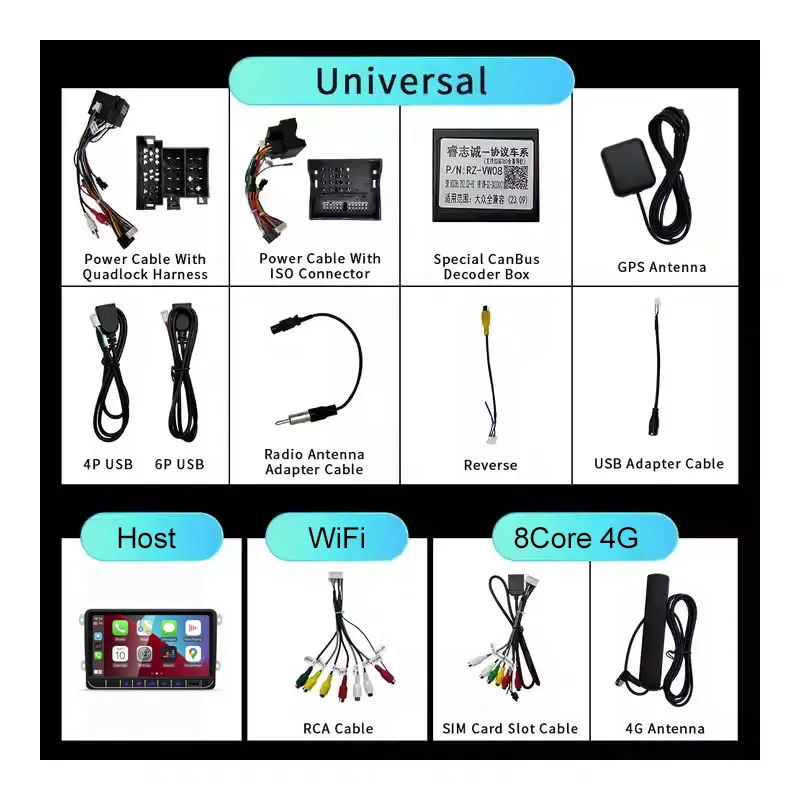
Ihre Bestellung wird anhand der korrekten Bildschirmart, des Stromkabelbaums, der CANBUS-Box, des Kamerasignaleingangs und der Audio-Schnittstellenanforderungen zusammengestellt.
Lenkradbedienelemente, Kameradisplay, Verstärker und Fahrzeugdaten werden über den korrekten Verkabelungs- und Einrichtungspfad gehandhabt, sofern unterstützt.
Das Ziel ist es, den ursprünglichen Hauptkabelbaum zu erhalten und eine zerstörungsfreie Installation zu ermöglichen, wenn das Fahrzeug eine unterstützte Armaturenbrett-Konfiguration verwendet.
iKAGOO unterstützt Verbindungsprüfung, Grundeinstellungen, CANBUS-Auswahl und Funktionstests nach der Installation.
Für Ihre Hardware gilt eine Garantie von 12 Monaten, einschließlich Kundendienst bei Fragen zum Produkt und zur Konfiguration nach der Lieferung.
Auftragsabwicklung
Sie geben Modell, Baujahr, Lenkradposition, Foto des Originalradios und Details zum Originalsystem an.
iKAGOO bereitet den richtigen Stromkabelbaum, CANBUS-Decoder, USB/GPS-Zubehör und die Anschlussrichtung der Kamera vor.
Wählen Sie Lite, Pro, Ultra oder Max basierend auf den Anforderungen an RAM, Speicher, DSP, Netzwerk und die 360-Kamera.
Testen Sie nach der Installation Radio, Sound, Lenkradbedienelemente, Kamera, CarPlay, Android Auto, GPS und Fahrzeugdaten, bevor Sie die Verkleidung wieder anbringen.
iKAGOO-Kaufbewertung
Dieses Upgrade bietet einen hohen Alltagsnutzen, wenn Ihr originales VW-Radio keine moderne Navigation, kabellose Telefonintegration oder brauchbare App-Unterstützung bietet.
Den Standard anzeigenDer korrekte Kabelbaum und das CANBUS-Setup sind für Lenkradbedienelemente, Audio, Kamera und den Erhalt der Fahrzeugdaten unerlässlich.
Den Standard anzeigenEmpfohlen für erfahrene Heimwerker oder professionelle Car-Audio-Installateure, da der Ausbau des Armaturenbretts, die Verkabelung und die CAN-Bus-Einrichtung erforderlich sind.
Den Standard anzeigenMedien-Special
Nutzen Sie iPhone-Karten, Anrufe und Musik auf dem Bildschirm des Headunits.
Verbinden Sie Android-Smartphones für Navigation, Anrufe und App-Steuerung.
Die Pro-, Ultra- und Max-Versionen bieten DSP-Unterstützung für eine bessere Klanganpassung.
Ausgewählte Versionen unterstützen mobile Daten für vernetzte Navigation und Apps.
Verbinden Sie Telefone und Audiogeräte für Anrufe und Medienwiedergabe.
Verwenden Sie je nach ausgewählter DriveMaster-Version FM- oder FM/AM-Radio.
Fügen Sie die Rückfahrkamera-Anzeige über den richtigen Kameraanschluss hinzu oder behalten Sie sie bei.
Die DriveMaster-Serie ist mit Android-13-Systemunterstützung gelistet.
Kaufvergleich
Spezifikationen
Wählen Sie die Version basierend auf Ihren Anforderungen an Leistung, Speicher, Audio und Kamera.
Versionsauswahl
Wählen Sie diese Option für grundlegende Navigation, Musik, Bluetooth und Telefonprojektion, wenn das Budget die Hauptpriorität ist.
Wählen Sie diese Option für stärkere Alltagsleistung, DSP-Audio und 4G-Unterstützung, ohne auf die höherwertigen Versionen umzusteigen.
Wählen Sie dies für besseres Multitasking, mehr RAM/Speicher, DSP, Netzwerkunterstützung und ein komfortableres tägliches Android-Erlebnis.
Wählen Sie dies, wenn Sie die Top-Konfiguration, stärkere Erweiterung und unterstützte 360-Kamera-Integration benötigen.
Fahrzeugkompatibilität
Dieses Produkt ist für viele VW-Plattform-Armaturenbretter vorgesehen. Bestätigen Sie vor der Bestellung die Form des Originalradios, das Modelljahr und die Audio-/Kamera-Konfiguration.
Vergleichen Sie die Form Ihres Werksradios vor der Bestellung. Der richtige Armaturenbrett-Stil hilft iKAGOO, die richtige Version vorzubereiten.
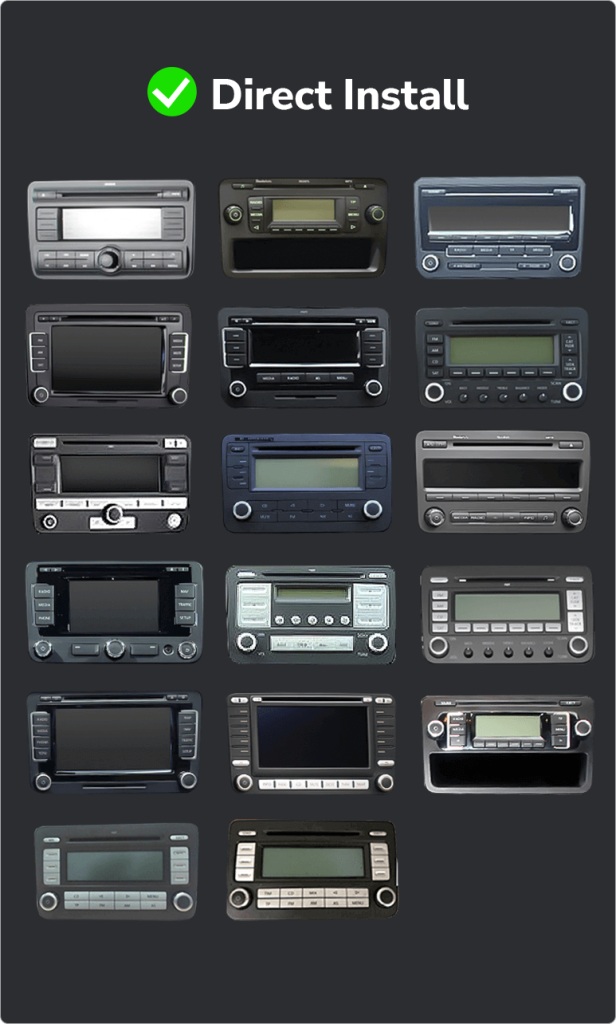
Wenn Ihr Armaturenbrett diesen Formen entspricht, bestellen Sie nicht blind. Möglicherweise benötigen Sie ein anderes Kit oder ein anderes Stereoformat.
Kabelbaum, Interface und Zubehör
Verbindet das Head-Unit über den vorbereiteten Verkabelungsweg mit dem Fahrzeugstrom- und Lautsprechersystem.
Hilft, Lenkradbedienelemente, Fahrzeugdaten und Werksinteraktion beizubehalten, wo die Fahrzeugkonfiguration dies unterstützt.
Unterstützt Navigationsempfang und USB-Zugriff für Telefonverbindung, Medien, Zubehör und Updates.
Unterstützt Rückfahrkamera-Eingang, mit zusätzlichen Prüfungen für Werkskamerasysteme und 360-Kamera-Setups.
Enthalten oder verwendet bei ausgewählten Versionen, die mobile Netzwerkverbindung unterstützen.
DSP-, Verstärker- und Audioausgabeverhalten hängt von der ausgewählten Version und dem originalen Werksaudiosystem ab.
Installationsanleitung
Dies ist eine Installation der Stufe 3 — Fortgeschrittenes DIY. Erfahrene DIY-Nutzer können sie durchführen, aber ein professioneller Car-Audio-Installateur wird empfohlen, wenn Sie sich nicht wohl dabei fühlen, Verkleidungen zu entfernen und die Verkabelung zu prüfen.
Kundendienst nach dem Kauf
Ihre Bestellung wird mit Sendungsverfolgung versandt. Die Lieferzeit hängt vom Bestimmungsort und der gewählten Versandart ab.
Hardware-Defekte sind gemäß den iKAGOO-Garantiebedingungen 12 Monate lang abgedeckt.
Es wird Unterstützung bei der Überprüfung der Anschlüsse, der CAN-Bus-Einrichtung, der Prüfung der Grundfunktionen sowie bei Fragen zur Konfiguration angeboten.
Häufig gestellte Fragen
In den meisten Fällen ja, wenn Ihr Modelljahr und die Form des Originalradios mit der unterstützten VW-Plattform-Armaturenbrettliste übereinstimmen. Senden Sie vor der Bestellung ein Foto Ihres Armaturenbretts, damit iKAGOO die richtige Version bestätigen kann.
Ja, die für dieses Produkt aufgeführten DriveMaster-Versionen unterstützen sowohl kabelgebundenes als auch kabelloses CarPlay und Android Auto.
Ja, die Lenkradbedienelemente bleiben erhalten, wenn der richtige Kabelbaum und der CAN-Bus-Decoder mit der ursprünglichen Fahrzeugkonfiguration übereinstimmen.
Das hängt davon ab, da sich die werkseitigen Kamerasysteme je nach Modell, Baujahr und Verkabelungsart unterscheiden. Bitte geben Sie bei der Bestellung die Originalangaben zu Ihrer Kamera an.
In den meisten Fällen ja, aber bei Premium-Audiosystemen müssen vor dem Versand das richtige Audio-Interface und die Verkabelung überprüft werden.
Nein, bei der vorgesehenen Installation kommen ein passender Kabelbaum und werkseitige Steckverbinder zum Einsatz. Brechen Sie die Installation ab, falls es notwendig erscheint, den Hauptkabelbaum des Fahrzeugs zu durchtrennen.
Es kommt darauf an. Lite ist für die grundlegende Nutzung, Pro bietet bessere tägliche Leistung und DSP, Ultra ist besser für intensivere Android-Nutzung, und Max ist für die Top-Konfiguration und unterstützte 360-Kamera-Anforderungen.
Ja, die Max-Version ist die Version, die für vollständige 360°-Unterstützung angegeben ist. Ob die 360°-Funktion tatsächlich erhalten bleibt, hängt jedoch weiterhin von Ihrem werkseitigen Kamerasystem und der Verkabelung ab.
Bitte geben Sie in den meisten Fällen das Fahrzeugmodell, das Baujahr, die Lage des Lenkrads, ein Foto des Armaturenbretts, ein Foto des Originalradios, den Typ der werkseitigen Kamera sowie Informationen zum werkseitigen Audiosystem an.
Ja, das ist sinnvoll, wenn man eine fahrzeugspezifische Vorbereitung wünscht. iKAGOO überprüft das Armaturenbrett, den Kabelbaum, den CAN-Bus und den Funktionserhaltungspfad, bevor es die richtige Version empfiehlt.
Bereit für ein Upgrade
Wählen Sie Ihre DriveMaster-Version, bestätigen Sie Ihren Armaturenbrettstil und senden Sie die erforderlichen Fahrzeuginformationen, damit iKAGOO den richtigen Bildschirm, Kabelbaum und Adapter für Ihren VW, SEAT oder Skoda vorbereiten kann.
Du musst logged in sein, um eine Bewertung abzugeben.


Klare Informationen über Fahrzeugkompatibilität, Auftragsvorbereitung, internationale Lieferung, Garantie, Rücksendungen und After-Sales-Support.
Fahrzeugspezifische Elektronik erfordert die korrekte Version, Verkabelung und Konfiguration. Unser Prozess ist darauf ausgelegt, vermeidbare Kompatibilitäts- und Installationsprobleme zu reduzieren.
Fahrzeugmodell, Baujahr, Originalsystem und relevante Konfigurationsinformationen können vor dem Kauf überprüft werden, um das Risiko der Auswahl der falschen Version zu verringern.
Vor dem Versand wird die Bestellung anhand der bestätigten Fahrzeuginformationen geprüft, damit die passende Version, Konfiguration und die erforderlichen fahrzeugspezifischen Komponenten vorbereitet werden können.
Unser Ziel ist es, Ihre Bestellung richtig zu bearbeiten, bevor sie uns verlässt. Wir prüfen die Kompatibilität, bereiten die richtige Einrichtung vor und kontaktieren Sie nur, wenn noch etwas bestätigt werden muss.
Eine praktische Zusammenfassung der wichtigsten Bedingungen, die für fahrzeugspezifische iKAGOO-Bestellungen gelten.
Die meisten iKAGOO-Bestellungen werden von unserem Fulfillment-Standort in China nach Prüfung der Produktkonfiguration und der Fahrzeuginformationen versendet.
Die normale Auftragsbearbeitung dauert ungefähr 1-3 Arbeitstage. Die voraussichtliche Lieferzeit nach dem Versand beträgt in der Regel:
Zollabfertigung, Feiertage, Wetter, Transportverzögerungen und Lieferungen in abgelegene Gebiete können diese Schätzungen beeinflussen.
Der standardmäßige internationale Versand umfasst normalerweise nicht die Mehrwertsteuer des Ziellandes, Einfuhrzölle, Vermittlungsgebühren oder Zollabfertigungsgebühren.
Für berechtigte Ziele in der Europäischen Union, DDP-Versand ist möglicherweise verfügbar. Einfuhrbezogene Gebühren sind nur enthalten, wenn DDP an der Kasse ausgewählt oder von iKAGOO vor dem Versand schriftlich bestätigt wurde.
Wenn DDP nicht ausgewählt wird, liegen Gebühren, die vom lokalen Zoll oder vom Zustellkurier erhoben werden, in der Regel in der Verantwortung des Empfängers.
Express- oder beschleunigter Versand ist möglicherweise für ausgewählte Produkte und Ziele verfügbar. Verfügbarkeit, Spediteur und eventuelle Zusatzkosten werden vor dem Versand bestätigt.
Je nach Route und Produkttyp kann iKAGOO DHL, FedEx, UPS, EMS, 4PX oder einen anderen Sendungsverfolgungs-Logistikanbieter nutzen.
Nach dem Versand wird die Sendungsnummer oder der Tracking-Link normalerweise an die für die Bestellung verwendete E-Mail-Adresse gesendet. Sendungsverfolgungs-Updates können während internationaler Spediteur-Übergaben mehrere Werktage benötigen, bis sie erscheinen.
Die Rückgabefähigkeit hängt vom Rückgabegrund, Produktzustand, Installationsstatus, unterstützenden Nachweisen und davon ab, ob die Rückgabe von iKAGOO genehmigt wurde.
Bei einer genehmigten, nicht-defekten Rückgabe muss das Produkt normalerweise unbenutzt, nicht installiert, vollständig und für den Wiederverkauf geeignet bleiben. Der Kunde ist in der Regel für die Versandkosten der genehmigten Rückgabe verantwortlich.
Die ursprünglichen Versandkosten, DDP, Mehrwertsteuer, Zollgebühren und andere Logistikkosten sind in der Regel nicht erstattungsfähig, es sei denn, dies ist gesetzlich vorgeschrieben oder von iKAGOO anderweitig bestätigt.
Senden Sie kein Produkt zurück, bevor Sie eine genehmigte Rücksendeadresse und Rücksendeanweisungen von iKAGOO erhalten haben.
Zusätzlicher Schutz kann gelten, wenn iKAGOO die Fahrzeugkompatibilität überprüft hat, der Kunde genaue Fahrzeugdaten angegeben hat und angemessene Installations- und Diagnoseschritte abgeschlossen wurden.
Wenn iKAGOO bestätigt, dass keine angemessene technische Lösung verfügbar ist und das Problem innerhalb 7 Kalendertage nach Lieferung, kann der Kunde möglicherweise eine Erstattung des Produktpreises erhalten, ohne dass das Produkt zurückgesendet werden muss.
Originalversand, DDP, Mehrwertsteuer, Zollgebühren und andere Gebühren Dritter sind in dieser Erstattung des Produktpreises nicht enthalten.
Förderfähige Produkte umfassen eine 12 Monate beschränkte Hardware-Garantie die verifizierte Herstellungsfehler und förderfähige Hardwarefehler bei normalem Gebrauch abdeckt.
Je nach verifiziertem Problem kann der Support Ferndiagnose, Konfigurationshilfe, Ersatzteile, Reparatur, Austausch, Teilerstattung oder vollständige Erstattung umfassen.
Eine Inspektion oder Prüfung durch Dritte annulliert nicht automatisch die gesamte Garantie. Schäden durch nicht autorisierte Reparaturen, unsachgemäße Modifikationen, defekte Schaltkreise, fehlerhaften Zusammenbau, falsche Verkabelung, Stöße, Wassereintritt oder Missbrauch sind jedoch normalerweise nicht abgedeckt.
Kontaktieren Sie vor dem Zerlegen, Modifizieren oder Reparieren des Produkts iKAGOO, damit die korrekte Diagnoseanleitung bereitgestellt werden kann.
Wenden Sie sich innerhalb von an iKAGOO 7 Kalendertage nach Lieferung und bewahren Sie die Originalverpackung, das Versandetikett, das Zubehör und das Produkt auf.
Bitte reichen Sie aussagekräftige Fotos oder Videos ein, die Folgendes zeigen:
Nach der Überprüfung kann iKAGOO eine Lieferung fehlender Teile, einen Ersatz, eine Reparatur, eine Rückerstattung oder eine andere zumutbare Lösung veranlassen.
Kontaktieren Sie iKAGOO so schnell wie möglich und vor der Installation. Für Adress-, Fahrzeugkonfigurations- oder Produktänderungen kontaktieren Sie uns vorzugsweise innerhalb 12 Stunden nach der Bestellung.
Ein Umtausch oder eine Rückgabe kann genehmigt werden, wenn ein falsch ausgewähltes Produkt unbenutzt, nicht installiert, vollständig und für den Wiederverkauf geeignet bleibt. Kunden sind in der Regel für relevante Versandkosten und Preisunterschiede verantwortlich.
Fahrzeugspezifische Produkte können kurz nach der Zahlung in Beschaffung, Programmierung, Tests oder Konfiguration übergehen. Sobald die Vorbereitung oder der Versand begonnen hat, ist eine Stornierung möglicherweise nicht mehr möglich, oder bereits angefallene angemessene Kosten können abgezogen werden.
Der Lieferumfang variiert je nach Produkt, Fahrzeugmodell, Werkssystem und gewählter Konfiguration.
Je nach Produkt kann das Paket das Hauptgerät, fahrzeugspezifische Kabelbäume, CANBUS-Schnittstelle, Adapter, USB-Kabel, Antennen, Mikrofone, Montagematerial oder andere erforderliche Installationszubehörteile enthalten.
Beachten Sie die entsprechenden Produktbilder, Spezifikationen und die Bestellbestätigung für den genauen Inhalt Ihrer Bestellung.
Sie können iKAGOO über das Kontaktformular der Website, WhatsApp oder andere verfügbare Support-Kanäle kontaktieren. Die typische Antwortzeit liegt innerhalb von 24 Geschäftsstunden.
Für eine schnellere technische Diagnose geben Sie Ihre Bestellnummer, Fahrzeugmodell und -jahr, relevante Fotos des Werkssystems, Produktfotos und ein klares Video, das das Problem zeigt, an.
Zahlungen werden über die sicheren Zahlungsmethoden abgewickelt, die beim Checkout angezeigt werden.
Verfügbare Karten-, Wallet- und Ratenzahlungsoptionen können je nach Land, Währung, Zahlungsanbieter und Kundenberechtigung variieren.
Ratenzahlungsdienste, einschließlich der von PayPal oder einem anderen Zahlungsanbieter angebotenen Optionen, unterliegen weiterhin der regionalen Verfügbarkeit und den Genehmigungsanforderungen dieses Anbieters.
Dieser Abschnitt ist ein vereinfachter Kundenleitfaden. Die vollständig veröffentlichten Richtlinienseiten, die Auftragsbestätigung und das anwendbare Verbraucherrecht haben Vorrang, falls abweichende Formulierungen vorliegen.
Rüsten Sie das digitale Kombiinstrument Ihres VW Polo 6R (Baujahre 2008–2016) mit einem LCD-Armaturenbrett-Display auf...
From: $295.00
Der endgültige Versand wird anhand Ihrer Lieferadresse an der Kasse bestätigt.

Wählen Sie aus, was Sie kaufen möchten. Wir zeigen nur die Details, die für dieses Produkt benötigt werden.
Wir werden die Details prüfen und Ihnen die empfohlene Produktversion an Ihre E-Mail.
Wir verwenden essenzielle Cookies, um die Website sicher und ordnungsgemäß funktionieren zu lassen. Mit Ihrer Einwilligung können wir auch Analyse-Cookies verwenden, um das Surferlebnis zu verbessern. Siehe unsere Datenschutzbestimmungen.




John.Doe -
Ich habe vor kurzem das Ikagoo Android-Stereo in meinen 2012er VW Golf eingebaut, und die Verbesserung ist bemerkenswert. Der Einbau war unkompliziert, und das Gerät fügt sich nahtlos in das Armaturenbrett ein. Das 10,33″ QLED-Display ist lebendig und reaktionsschnell, und die drahtlosen CarPlay- und Android Auto-Funktionen funktionieren einwandfrei. Ich schätze auch den eingebauten DSP für verbesserte Audioqualität. Insgesamt ist es ein bedeutendes Upgrade, das sowohl die Funktionalität als auch die Ästhetik meines Autos verbessert.
Jiménez Andrés -
Ho installato questa unità Android sulla mia Volkswagen e sono molto soddisfatto. Il display è chiaro e l'integrazione con il cruscotto originale è perfetta. La navigazione GPS e la compatibilità con CarPlay wireless rendono la guida più sicura e piacevole. Die Installation ist einfach und die Benutzeroberfläche intuitiv.